Why Two Customers in the Same City See Different Results (and Why Rank Reports Mislead)
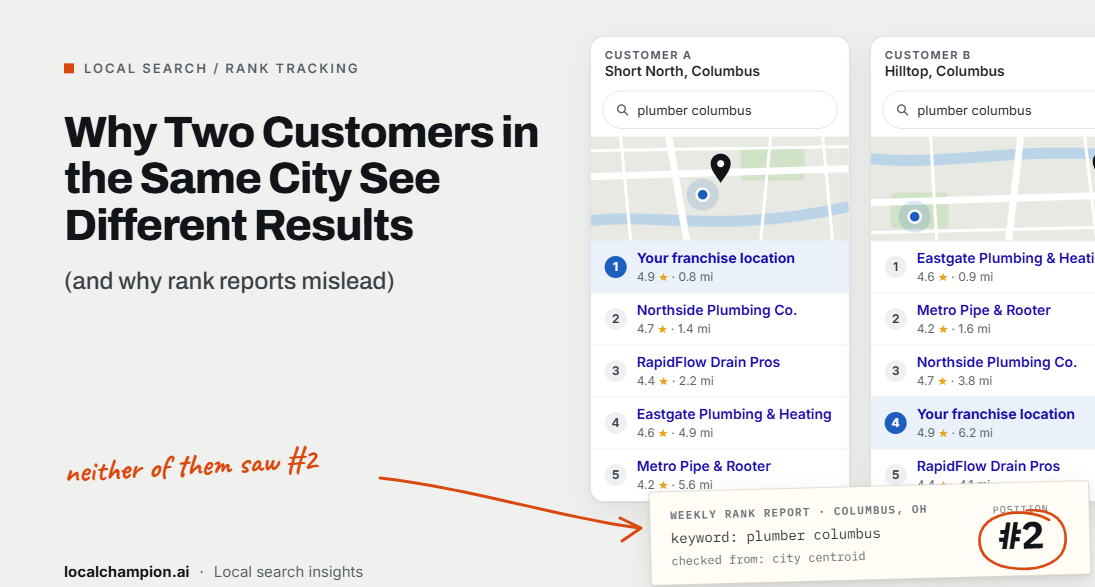

Two people in the same city can type the same search and see different Google Maps results because Google ranks local businesses in context. Google says local results are mainly based on relevance, distance and prominence, and distance is measured from each searcher’s own location (Google Business Profile Help). Change where someone stands, how they word the search or what device they use, and the list can change too. Neither result is wrong.
Here is a hypothetical example. A customer in Indiranagar searches “dentist near me” and sees a particular clinic in the top three. Her colleague in Whitefield, about 12 km away, runs the same search and that clinic doesn’t appear on the first screen at all. The clinic’s agency report still says it “ranks #3 in Bangalore.”
That report isn’t lying. It’s just answering a narrower question than the business thinks it’s asking.
In short: Google Maps ranking differences come mainly from distance, search wording and business relevance and prominence, with search context such as language and device playing a smaller role. A business doesn’t have one ranking in a city. It has a pattern of visibility that changes by neighborhood and query. Measure that pattern across multiple locations, then judge it by calls, bookings and leads, not one number.
Why Does Google Show Different Local Search Results to People in the Same City?
Google’s local ranking help page names three factors that work together: relevance, distance and prominence. The page’s summary now says “relevance, distance, and popularity,” while its section headings still use “prominence” (Google Business Profile Help). Google also states there’s no way to request or pay for a better local ranking, and it keeps algorithm details confidential. Everything beyond those three factors is industry observation, not confirmed policy.
1. Searcher location and proximity
Distance is how far each business is from the person searching. If the searcher doesn’t share a location, Google uses what it knows about where they are. Google’s Search Help confirms that, even with personalization turned off, Search uses the searcher’s current location, from IP address or device location, for searches like “pizza near me” (Google Search Help).
That’s why a clinic can rank strongly near its own door and fade a few kilometres away. In the hypothetical above, Indiranagar is close to the clinic and Whitefield isn’t, so the competing clinics near Whitefield win on distance.
Distance is important, but it isn’t everything. A more relevant or more prominent business can outrank a closer one. That’s also why the closest business doesn’t always appear first.
2. Search intent and keyword wording
Small wording changes can change which businesses Google considers relevant:
- “dentist near me” leans heavily on the searcher’s location.
- “emergency dentist” narrows relevance to clinics whose profiles and websites signal urgent care, and may reward businesses open now.
- “dentist in Bangalore” names a place, so Google can widen the area it considers, even if the searcher is elsewhere.
- “best dental clinic near me” keeps the location focus but adds a quality qualifier.
The last three behaviours are reasonable interpretations, not documented Google rules. The practical lesson stands either way: track keyword groups by intent, not one generic term.
3. Business relevance and prominence
Relevance is how well a Business Profile matches the search. Google says complete and detailed business information, such as category, address, hours and attributes, helps it match a profile to relevant searches.
Prominence is how well-known a business is. Google says this draws on information such as how many websites link to the business and how many reviews it has, and that more reviews and positive ratings can help local ranking. No single action guarantees a position. These signals shift how far a business’s visibility reaches beyond its immediate area.
4. Personalization and search context
Google separates context from personalization. Context includes location, language, device type, recent searches and time. Results can also differ between searches minutes apart as new content appears and ranking updates roll out across data centres (Why your Google Search results differ).
Personalization uses information in a signed-in user’s Google Account, such as search history and saved places. Google says it doesn’t affect all results and only reranks when it’s likely to be more helpful, and sometimes the effect is too small to change anything.
So don’t blame personalization for every ranking difference. For local searches, location and query wording are usually the more direct explanation.
5. Google Maps versus Google Search
A business can perform differently on each surface, so treat them as separate results:
| Surface | What appears | Measure it as |
| Google Maps | A list of places in the Maps app or site | Maps rank |
| Local pack | The short list of places with a map inside Google Search | Local pack rank |
| Organic results | Website links below or around the local pack | Organic rank |
| Sponsored placements | Paid ads, including Local Services Ads | Not a ranking; report separately |
Combining these into one “Google ranking” hides where a business is actually winning or losing.
Why Traditional Local SEO Rank Reports Can Be Misleading
A line like “Your business ranks #3 in Bangalore” sounds definitive. In reality, it usually describes one result, captured under one set of conditions:
- One simulated location. Many trackers search from a single point, often the city center or a postcode centroid.
- A point customers don’t search from. The city center may be nowhere near where the business’s customers live or work.
- One device type. A desktop check may not match what a customer sees on a phone, where Google uses device location.
- A small keyword sample. Tracking two or three terms says little about the dozens of ways customers search.
- One surface. Some tools check Maps, some check the local pack and some check organic results, and the report may not say which.
- One moment. Google says results can differ from search to search over time (Google Search Help).
- One tool’s method. Grid spacing, how “not found” is scored and how averages are calculated all vary by vendor.
None of this makes rank tracking inaccurate. A single-point ranking can be a perfectly valid measurement of what it tests. The problem is reading it as a city-wide verdict. Even geo-grid vendor Local Falcon acknowledges there’s no “perfect” local scan, because everyone sees slightly different results in real-world searches (Local Falcon FAQ).
What Is Geo-Grid Rank Tracking?
Geo-grid rank tracking checks a business’s local ranking from many points spread across a map, instead of from one spot. Each grid point is searched from its own coordinates, so the result approximates what a searcher standing there might see. The output is a map of rankings, usually color-coded from strong to weak.
Here is a hypothetical 5×5 geo-grid for one clinic and the keyword “dentist near me,” with points about 1.5 km apart. The clinic sits at the center point (★). Each number is the clinic’s Maps position at that point.
| West | Center | East | |||
| North | 3 | 2 | 4 | 7 | 12 |
| 2 | 1 | 1 | 3 | 9 | |
| Center | 1 | 1 | 1 ★ | 2 | 6 |
| 2 | 1 | 2 | 5 | 14 | |
| South | 4 | 3 | 6 | 11 | 20+ |
Hypothetical data for illustration. Suggested for publishing: render this as a color-coded heatmap graphic.
The grid shows things a single number can’t:
- The clinic is in the top three at 14 of 25 points, mostly around and west of its location.
- Visibility fades to the east and south-east, where competitors are likely closer to searchers.
- If a tracker happened to check only from the north-east corner, the report would say “#12.” From the center, it would say “#1.” Both are true.
Single-point tracking vs geo-grid reporting
| Single-point ranking | Geo-grid reporting | |
| Search locations | 1 | Many (25 in this example) |
| Typical output | “Rank #3” | A map plus summary metrics |
| Shows proximity effect | No | Yes |
| Shows weak neighborhoods | No | Yes |
| Competitor view by area | No | Usually |
| Main risk | Mistaken for a city-wide rank | Mistaken for every real user’s experience |
Why Geo-Grid Reports Are More Useful Than a Single Ranking Number
Geo-grid reports turn “Where do we rank?” into “Where are we visible, and where aren’t we?” That helps teams:
- See how visibility changes with distance from the business
- Spot specific neighborhoods worth investigating
- Check visibility across the business’s realistic service area
- Compare competitors area by area
- Report on many locations using one consistent method
Geo-grids have real limits too:
- Sampling design shapes the answer. Grid size and spacing change the result. A wide grid can make a neighborhood business look weak.
- Results are snapshots. A scan run tomorrow may differ slightly.
- Points are simulated. A grid point approximates a searcher’s location but can’t reproduce every device, account or setting.
- Tools measure different surfaces. Some scan Google Maps, others the local pack.
- Metrics differ by vendor. Local Falcon, for example, defines Share of Local Voice (SoLV) as how often a business appears in the top three, and separates average rank across points where it’s found from average rank across all points (Local Falcon). Other tools calculate similar-sounding metrics differently.
- Coverage isn’t customers. A bigger green area doesn’t automatically mean more calls or bookings.
How to Build a More Accurate Local SEO Ranking Report
A better report measures visibility where customers actually are, keeps conditions consistent, and ties rankings to outcomes. Six steps get you there.
Step 1: Define the actual market area. Start from where customers really come from, not the city boundary. A neighborhood bakery and a city-wide plumbing company need very different grids.
Step 2: Select relevant local search queries. Group keywords by intent:
- Branded searches (“YourBrand Dental Koramangala”)
- Core service searches (“dentist,” “dental clinic”)
- High-intent searches (“emergency dentist,” “root canal treatment”)
- Location-modified searches (“dentist in HSR Layout”)
- Relevant “near me” searches
Step 3: Measure across multiple locations. Use a geo-grid sized to the market. Dense urban areas usually need tighter spacing. Suburban or service-area businesses may need wider grids.
Step 4: Track Maps and local pack results separately. Label every observation with its surface. Never blend Maps, local pack and organic positions into one figure.
Step 5: Compare over time under the same conditions. Keep keywords, coordinates, grid boundaries, device settings, surface, collection frequency and calculation method constant. Change any one of them and a “drop” may just be a measurement change.
Step 6: Add business performance data. Combine rankings with Google Business Profile performance data, such as calls, website clicks and direction requests (Google Business Profile Help). Add Google Search Console clicks to location pages, plus bookings, enquiries and qualified leads. These datasets don’t line up perfectly. A rise in calls can come from seasonality or ads, so treat links between them as evidence, not proof.
Local SEO Metrics That Matter More Than One Ranking Number
| Metric | What it measures | Key limitation |
| Single-point ranking | Position at one search location | Doesn’t represent the whole city |
| Geo-grid visibility | Rankings across multiple sampled points | Depends on sampling design |
| Share of local visibility | Presence relative to selected competitors | Depends on tracked queries and locations |
| GBP performance | Interactions such as calls, website clicks and directions | Includes Google Ads interactions; doesn’t explain ranking changes |
| Organic search clicks | Visits from Google Search | Doesn’t capture all Maps interactions |
| Qualified leads | Meaningful customer enquiries | Requires reliable conversion tracking |
| Location-level conversions | Business outcomes by location | Attribution may be incomplete |
Define every metric in the report itself. “Average grid rank,” “share of visibility” and “coverage” are calculated differently by different tools, and a reader can’t compare them without knowing how.
What Multi-Location Brands Should Track Differently
For franchises and enterprise brands, the goal isn’t one network-wide ranking. It’s a fair, consistent view of each location in its own market.
- Track each location within its realistic market. Size every grid to the area that location actually serves.
- Use the same keyword categories everywhere. Keep branded, core, high-intent and “near me” groups consistent so locations can be compared.
- Compare like with like. Benchmark locations against others with similar density and competition, not against the network average.
- Watch for overlap. Nearby branches can compete for the same searches. Overlapping grids show where one location’s visibility ends and another’s begins.
- Separate network trends from local changes. If every location dips in the same week, look for a broad cause before blaming local teams.
- Pair visibility with customer actions. Report calls, bookings and leads per location alongside rankings.
- Set one reporting standard. Agencies and franchisees should use the same grid rules, keywords and metric definitions.
Hypothetical example: urban vs suburban
A fitness franchise has one club in a dense central business district and one on a suburban main road. Both are scanned with an identical 10 km grid.
The city club appears in the top three across a small area, because dozens of gyms sit within a kilometre of every grid point. The suburban club appears in the top three across most of the grid, because there are few competitors nearby.
Judged by the same grid, the city club looks like the weaker performer. In reality, it may have more members, more calls and a stronger profile. Its market is just far more crowded. A tighter grid for the city club, and comparisons against other dense-market clubs, give a fairer picture.
Common Mistakes Businesses Make When Checking Google Maps Rankings
| # | Mistake | Do this instead |
| 1 | Searching for your own business from the office and assuming every customer sees the same | Your location, account and history shape your results. Use a geo-grid. |
| 2 | Using one city-center ranking as a city-wide benchmark | Measure across your real service area. |
| 3 | Comparing rankings collected from different locations | Keep the same coordinates every period. |
| 4 | Counting paid placements as organic rankings | Report sponsored results separately. |
| 5 | Tracking only branded keywords | Add core service, high-intent and “near me” searches. |
| 6 | Ignoring mobile vs desktop differences | Record the device setting for every check. |
| 7 | Assuming every drop is a Google penalty | Check competitors, grid changes and profile edits first. |
| 8 | Changing grid boundaries between reports | Lock grid size and spacing, or restart the baseline. |
| 9 | Comparing different tools without checking method | Compare like-for-like metrics from one tool. |
| 10 | Reporting ranking gains without customer outcomes | Pair rankings with calls, bookings and leads. |
Google Maps Rank Tracking Checklist
- ☐ Define the business’s realistic target area
- ☐ Identify relevant branded and non-branded queries
- ☐ Track rankings from multiple geographic points
- ☐ Keep geo-grid coordinates consistent over time
- ☐ Separate Maps, local pack and organic results
- ☐ Document device and search settings
- ☐ Distinguish sponsored from unpaid placements
- ☐ Monitor relevant local competitors
- ☐ Track performance across multiple reporting periods
- ☐ Combine visibility data with GBP and website analytics
- ☐ Measure leads and conversions where possible
- ☐ Explain data limitations in stakeholder reports
How Often Should Businesses Monitor Local Rankings?
Monitor often enough to spot trends, not so often that you react to noise. Single scans move around, so a pattern across several periods matters more than one bad day.
| Business type | Suggested frequency | Why |
| Single-location small business | Monthly | Enough to see trends without chasing fluctuations |
| Competitive service-area business | Every 2 weeks | Faster feedback in crowded markets |
| Multi-location brand | Weekly or every 2 weeks, by location | Catches location-level problems early |
| Franchise across several markets | Weekly network summary, monthly deep dive | Balances oversight with analysis time |
Daily tracking rarely makes sense for most businesses. It can help during a site migration, a relocation or a profile suspension, then drop back to the normal schedule. These frequencies are practical recommendations, not Google guidance.
How to Explain Ranking Differences to Business Owners and Stakeholders
Compare two ways of reporting the same scan:
Oversimplified: “Your business ranks #2 in Google Maps.”
Informative (hypothetical): “Across 25 sampled search locations, your business appeared in the top three results at 14 points for ‘dentist near me.’ Visibility was stronger near the clinic and weaker in the outer neighborhoods to the east.”
The second version tells the owner where they’re strong, where they’re not and what to look into next. It still needs a short methodology note: the keyword, grid size and spacing, the surface measured (Maps or local pack), the scan date and the tool used. Without that, even a good statement can be misread.
What Businesses Should Do Next
- Stop treating one ranking position as a city-wide performance measure.
- Ask how your current rank tracker collects its data: location, device, surface and frequency.
- Set a realistic geographic tracking area for each location.
- Track relevant non-branded customer searches, grouped by intent.
- Compare performance only across consistent geographic samples.
- Improve Google Business Profile accuracy and the content on each location page.
- Investigate weak areas, but accept that you can’t always overcome distance.
- Measure calls, leads, bookings and other business outcomes.
- Build reports that explain trends, limitations and next actions.
Conclusion: Local Visibility Is a Geographic Pattern, Not a Single Position
Two customers in the same city see different local results because Google evaluates every search in context: where the searcher is, what they typed and how well each business matches. That isn’t a flaw in Google or in rank tracking. It’s how local search works.
Traditional ranking reports still have value when they’re read for what they are. But one number can’t describe a business’s visibility across a city. Measure across the places your customers search from, keep the method consistent, and judge success by customer outcomes, not position alone.
Want a clearer picture of where your locations are visible and where they’re not? Explore Local Champion’s Google Business Profile optimization services or contact the team for help understanding and improving your local visibility.
SEO Metadata
| Element | Recommendation |
| SEO title (57 chars) | Google Maps Ranking Differences: Why Results Vary by Area |
| Meta description (~158 chars) | Why do Google Maps rankings vary across one city? Learn how distance, search intent and context shape local results, and how to measure visibility accurately. |
| URL slug | /blog/google-maps-ranking-differences/ |
| H1 | Why Two Customers in the Same City See Different Results (and Why Rank Reports Mislead) |
| Primary keyword | Google Maps ranking differences |
| Secondary keywords | why Google Maps rankings vary, local search ranking factors, Google Maps ranking by location, local SEO rank tracking, Google Business Profile rankings, Google local pack rankings, Google Maps proximity ranking, local search personalization, local SEO reporting, Google Maps geo-grid ranking, local keyword rank tracking, local SEO visibility, Google Maps ranking fluctuations, multi-location SEO reporting, local search results variation, Google Maps ranking accuracy |
H2/H3 headings used: Why Does Google Show Different Local Search Results to People in the Same City? (H3s: Searcher location and proximity · Search intent and keyword wording · Business relevance and prominence · Personalization and search context · Google Maps versus Google Search) · Why Traditional Local SEO Rank Reports Can Be Misleading · What Is Geo-Grid Rank Tracking? · Why Geo-Grid Reports Are More Useful Than a Single Ranking Number · How to Build a More Accurate Local SEO Ranking Report · Local SEO Metrics That Matter More Than One Ranking Number · What Multi-Location Brands Should Track Differently · Common Mistakes Businesses Make When Checking Google Maps Rankings · Google Maps Rank Tracking Checklist · How Often Should Businesses Monitor Local Rankings? · How to Explain Ranking Differences to Business Owners and Stakeholders · What Businesses Should Do Next · Conclusion
FAQs
Why do Google Maps rankings vary in the same city?
Google says local results are mainly based on relevance, distance and prominence. Distance is measured from each searcher’s location, so people in different neighborhoods see different businesses for the same search. Query wording, language, device and timing can also change results. A business doesn’t have one fixed ranking across a city.
Does personalization change Google Maps results?
Sometimes, but less than most people assume. Google says personalization uses signed-in account information, such as search history, and doesn’t affect all results. Location, language and device are treated as search context and apply even with personalization off. For local searches, distance and query wording are usually the bigger reasons results differ.
Why doesn’t the closest business always rank first?
Distance is only one of Google’s three main local ranking factors. A business farther away can rank higher if its profile is more relevant to the search or it’s more prominent, for example through more reviews, positive ratings and links from other websites. Google doesn’t publish how these factors are weighted.
What is geo-grid rank tracking?
Geo-grid rank tracking checks a business’s local ranking from many points spread across a map, such as a 5×5 grid of 25 locations. Each point is searched from its own coordinates. The result shows where a business is visible and where competitors win, which a single ranking number can’t show. Results are simulations, not every real user’s view.
Why does my rank tracker show a different position than I see on my phone?
Your phone search uses your current location, device type and possibly your account history. A rank tracker searches from a set location, often on simulated desktop or mobile settings, at a different time. Both can be accurate for their own conditions. Compare tracker data only with searches made under the same conditions.
How often should I check my local rankings?
Most single-location businesses can check monthly. Competitive service-area businesses may check every two weeks, and multi-location brands weekly or every two weeks per location. Daily checks rarely help except during major changes such as a relocation. Focus on trends across several periods rather than reacting to one fluctuation.
Is the Google Maps ranking the same as the local pack ranking?
No. Google Maps results and the local pack shown inside Google Search are separate surfaces, and a business can rank differently on each. Organic website results and sponsored ads are different again. Track each surface separately and label every ranking with the surface it came from.
Internal Link Recommendations
URLs verified on localchampion.ai, which mirrors localchampion.co (the .co site blocks automated readers). Confirm each path resolves on .co before publishing.
| Anchor text | URL | Where to place it |
| Google Business Profile optimization services | https://localchampion.co/google-business-profile-optimization/ | Conclusion CTA (already linked) |
| contact the team | https://localchampion.co/contact/ | Conclusion CTA (already linked) |
| Google Maps ranking factors | Top Google Maps ranking factors explained | Relevance and prominence H3 |
| local search intent | Why local search intent is different from general SEO | Search intent H3 |
| calls dropping while rankings look fine | Why your calls are dropping even though your rankings look fine | Step 6 or the metrics table |
| track Google Business Profile performance | How to track GBP performance | Step 6 |
| multi-location GBP strategy | Multi-location GBP strategy | Multi-location section |
| rank every franchise location | How to rank every franchise location on Google | Multi-location section |
| rank higher on Google Maps | How to rank higher on Google Maps | What Businesses Should Do Next, item 6 |
External References (all opened and checked October 26, 2026)
| Source | URL | Supports |
| Google Business Profile Help: Tips to improve your local ranking on Google | https://support.google.com/business/answer/7091?hl=en | Relevance, distance, prominence; no paid ranking |
| Google Search Help: Why your Google Search results differ from others | https://support.google.com/websearch/answer/12412910 | Time, context (location, language, device), personalization limits |
| Google Search Help: Manage Personalized Recommendations in Search services | https://support.google.com/websearch/answer/17026260?hl=en | Current location via IP or device even with personalization off |
| Google Business Profile Help: Business Profile performance & insights | https://support.google.com/business/answer/9918094 | GBP performance metrics (linked from Google’s ranking page) |
| Local Falcon: How to read a scan report | https://www.localfalcon.com/knowledge-base/kb72-how-to-read-a-scan-report | Geo-grid method and SoLV / ARP / ATRP definitions |
| Local Falcon: FAQ | https://www.localfalcon.com/frequently-asked-questions | No “perfect” local scan; multi-point vs single-point tracking |