How Often Should You Update Your Google Business Profile? The Complete 2026 Schedule

⚠️ Disclaimer: Google Business Profile features and ranking signals may change over time. Always refer to the Google Business Profile Help Centre for the most current guidance.
Most businesses optimize their Google Business Profile once — and then forget it exists. That’s a costly mistake. Google rewards profiles that are accurate, active and continuously updated. An outdated GBP signals an inactive business, reduces trust with potential customers, and gradually loses ranking ground to competitors who are posting, uploading photos and responding to reviews every week.
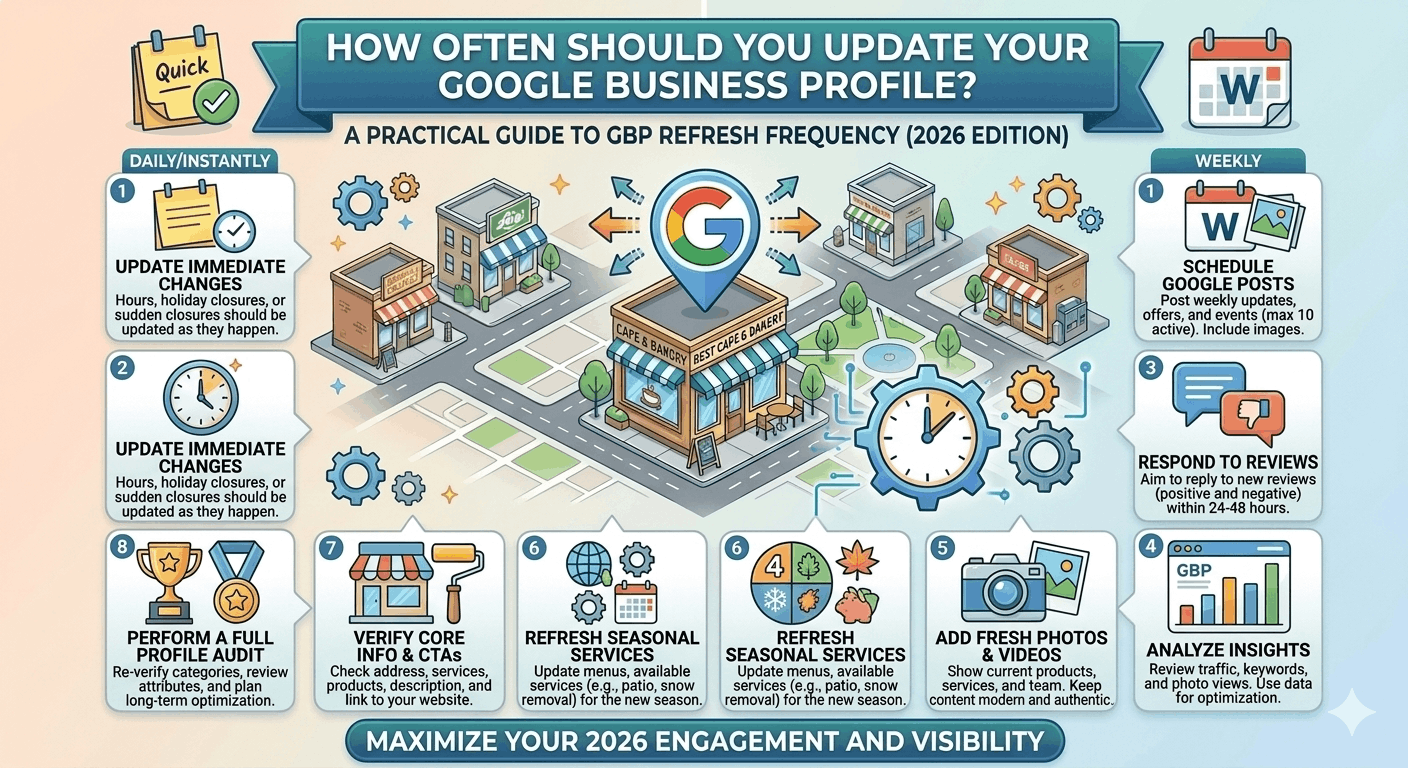
The short answer: review your profile monthly, update critical information immediately when anything changes, post weekly, upload photos regularly, and respond to every review within 24–48 hours.
In this guide you will get a complete update schedule for every GBP element, industry-specific recommendations, a monthly maintenance checklist, and the exact signals that Google and AI search tools use to reward active profiles.
Quick Answer: How Often Should You Update Your Google Business Profile?
Update your Google Business Profile based on the type of change: immediately for critical information (hours, address, phone, website); weekly for Google Posts and review responses; monthly for photos and Q&A; quarterly for descriptions, services and citation audits; every 6 months for category review. The most important principle: never let your profile go more than 7 days without some form of engagement — a post, a photo, or a review response.
| GBP Element | Update Frequency | Priority | Ranking Impact | Time Required |
| Review responses | Within 24–48 hours | 🔴 Critical | High | 2–5 min each |
| Google Posts | 1–2 per week | 🔴 Critical | High | 10–15 min each |
| New photos | 2–4 per month | 🟠 High | High | 15–20 min/batch |
| Opening hours | Immediately on change + holiday hours seasonally | 🔴 Critical | Very High | 5 min |
| Business description | Quarterly or when services change | 🟡 Moderate | Moderate | 20–30 min |
| Services / Products | Immediately on change; quarterly audit | 🟠 High | Moderate | 15–30 min |
| Q&A section | Monthly — seed new questions + respond to new ones | 🟡 Moderate | Moderate | 10 min |
| Attributes | When new ones become available or business changes | 🟡 Moderate | Low–Moderate | 5–10 min |
| Category audit | Every 6 months | 🟡 Moderate | Very High (if wrong) | 15 min |
| Citation consistency | Quarterly audit | 🟠 High | High | 30–60 min |
| Competitor monitoring | Monthly | 🟡 Moderate | Indirect | 15 min |
Why Regular GBP Updates Matter
Google’s local ranking algorithm evaluates profile freshness as part of its quality assessment. An inactive profile — no new posts, no new photos, unanswered reviews — gradually loses prominence against actively managed competitors. Here is why each type of update matters:
- Data accuracy — incorrect hours or a wrong address sends customers to the wrong place or turns them away. Google penalises inaccurate profiles through reduced trust signals.
- User trust — a profile with photos from 2021 and no recent reviews looks abandoned, regardless of how good your actual reviews are.
- Ranking signals — Google Posts, photo uploads and review responses all generate fresh content signals that feed your profile’s activity score.
- AI search visibility — Google AI Overviews, ChatGPT and Gemini prioritise businesses with complete, current entity data. A profile not updated in months has weaker entity confidence than one updated last week.
💡 Key insight: Google’s AI systems are learning to identify ‘active’ businesses vs ‘passive’ ones. An active profile generates compounding SEO benefits — each new post, photo and review response incrementally strengthens your local authority.
Google Business Profile Elements You Should Update Regularly
Business Hours
Hours are the highest-stakes GBP element for customer trust. Incorrect hours lead directly to negative reviews (‘They were closed when they said they’d be open’) and lost customers.
- Update immediately when your regular hours change — never let incorrect hours sit for more than 24 hours.
- Add special hours for every public holiday at least 2 weeks in advance. Without holiday hours set, Google displays ‘Hours may differ’ — which causes many customers to call ahead or choose a competitor.
- Use temporary closures for planned shutdowns (renovations, annual leave, COVID compliance) rather than removing your profile.
Business Description
Your description doesn’t need frequent changes — but it should be reviewed every quarter and updated whenever you add significant new services, open new locations, or change your core value proposition. A 2-year-old description that no longer reflects what your business does is actively misleading.
Products and Services
Update your services list immediately when you add or remove a service. Customers who contact you based on a service that’s no longer available create negative experiences and potentially negative reviews. Quarterly audits of your services list keep it accurate.
Photos and Videos
✅ Businesses with 100+ photos receive significantly more website clicks and direction requests than profiles with fewer than 10. Aim for 3–4 new geotagged photos per month — exterior, interior, team, completed projects or seasonal content.
- Upload new project photos immediately after completion — before-and-after shots perform particularly well for trade and service businesses.
- Refresh your cover photo seasonally to keep the profile feeling current.
- Never reuse the same photos across multiple GBP locations — each location must have unique visual content.
Google Posts
Google Posts are the most direct freshness signal you can control. A profile with regular posts ranks higher than an identical profile with no posts. The minimum is one post per week — the optimum is two: one promotional or event post and one update or tip post.
Post types to rotate: offer posts (promotions with start/end dates), event posts (community events, open days), update posts (news, team highlights, service spotlights), and seasonal posts (holiday trading, weather-related tips).
Questions and Answers
Check your Q&A section monthly. Google allows anyone to answer your Q&A questions — including competitors. Unanswered or incorrectly answered questions should be corrected immediately. Seed 3–4 new questions each quarter that address current customer concerns or new services.
Reviews and Responses
Set a hard rule: respond to every review within 48 hours. For negative reviews, aim for 24 hours or less — a fast, professional response to a negative review converts more readers than the negative review deters.
⚠️ Never let a review go unanswered for more than 7 days. Unanswered reviews signal disengagement to both Google and prospective customers. Google tracks your response rate and displays it on some profile views.
Attributes
Review your attributes quarterly or whenever Google makes new attributes available for your category. New attributes unlock when Google updates its category taxonomy — check the GBP dashboard after any major Google update for new options relevant to your business type.
Events That Require Immediate GBP Updates
⚡ These changes must be made in your GBP the same day they occur — delays create customer confusion and negative reviews.
- Business relocation — update address, re-pin your location on Maps, and begin the re-verification process immediately.
- Phone number changes — update across GBP, website, all citations and social profiles simultaneously.
- Website URL changes — update your GBP website link and check that UTM tracking parameters are correct.
- Ownership changes — the new owner must claim the profile under their account and update contact details.
- Rebranding — update business name, logo, cover photo, and description simultaneously to maintain consistency.
- Service area changes — for SABs, update service areas the same day you expand or contract your coverage.
- Temporary or permanent closure — use the ‘Temporarily Closed’ feature rather than deleting the profile. For permanent closure, mark the profile as permanently closed.
Industry-Specific Update Recommendations
| Industry | Highest-Priority Updates | Recommended Cadence |
| Restaurant | Menu changes, daily specials post, holiday hours, photo of new dishes | Daily posts (specials) + weekly photo uploads |
| Healthcare | Holiday hours, new practitioners, updated appointment link, health services | Hours: immediately; new services: same week |
| Real Estate | Market update posts, new listings post, agent bio photos, seasonal content | Weekly posts; photos after every listing |
| Home Services | Completed project photos (before/after), seasonal offer posts, service area updates | 2–3 project photos/week; seasonal posts monthly |
| Retail Store | New arrivals post, sale events, updated hours, seasonal product photos | Weekly posts; hours updated for every sale/event |
| Multi-location | Sync hours across all profiles, per-location post kits, network review monitoring | Centrally coordinated monthly; real-time for hours |
Common GBP Update Mistakes
| Mistake | Why It Hurts | Correct Approach |
| Keyword-stuffed updates | Policy violation; can trigger profile review | Keep descriptions and posts natural and informative |
| Making edits too frequently | Rapid changes trigger spam filters | One significant change at a time; wait 48–72 hours between |
| Ignoring suggested edits | User edits can override your data without notice | Check GBP dashboard weekly for unapproved changes |
| Low-quality or blurry photos | Reduces click-through rate and engagement | Minimum 720×540px; well-lit, professionally composed |
| Neglecting holiday hours | ‘Hours may differ’ warning deters customers | Set holiday hours 2 weeks in advance for every public holiday |
| Never posting | Inactive profiles rank below consistently active ones | Schedule posts in advance; use a content calendar |
How to Monitor GBP Performance
Tracking the right metrics shows whether your updates are working — and flags when something needs attention:
| Metric | What It Tells You | Where to Find | Check Frequency |
| Search impressions | How often your profile appears in search | GBP Insights | Monthly |
| Website clicks | GBP-sourced traffic to your site | GBP Insights / GA4 | Monthly |
| Phone calls | Direct call conversions from Maps | GBP Insights / CallRail | Monthly |
| Direction requests | Foot traffic intent signals | GBP Insights | Monthly |
| Photo views | Content engagement signal | GBP Insights | Monthly |
| Local Pack rank | Maps position for target keywords | Local Falcon | Monthly |
| Review growth | New reviews per month | GBP / BrightLocal | Monthly |
| Post engagement | Clicks and actions on Google Posts | GBP Insights | Per post |
Recommended tools:
- GBP Insights (free) — native dashboard for impressions, clicks, calls, directions and photo views
- Google Search Console (free) — tracks local keyword impressions and click-through rates
- Google Analytics 4 (free) — measures GBP-sourced website traffic and conversions via UTM links
- BrightLocal (from $39/mo) — multi-location review tracking, citation auditing, rank reporting
- Local Falcon (from $24/mo) — geo-grid Maps rank tracking correlated with update activity
How GBP Updates Affect AI Search Visibility
AI search tools in 2026 — Google AI Overviews, Gemini, ChatGPT and Perplexity — use your GBP profile as a primary data source when generating local business recommendations. Here is how regular updates improve your AI search visibility:
Entity consistency and trust:
AI systems evaluate whether your entity data is internally consistent and matches your website, citations and social profiles. Outdated GBP information that conflicts with your website (e.g., old phone number, old address) creates entity confidence issues that reduce your citation likelihood.
Content freshness signals:
AI tools that index Google Maps data preferentially surface businesses that appear actively managed. A profile with recent posts, recent reviews and recent photos has stronger freshness signals than one last updated 18 months ago.
Review sentiment:
AI tools analyse the sentiment and keyword themes in your review content when generating recommendations. A profile with recent, specific, positive reviews (‘fantastic same-day plumbing repair’ vs ‘great service’) is significantly more likely to be recommended for specific service queries.
💡 Key insight: Think of AI search tools as evaluating your GBP the same way a very thorough customer would — checking recency, consistency, sentiment and completeness simultaneously. Every update you make improves your score on at least one of those dimensions.
Monthly Google Business Profile Maintenance Checklist
Weekly (ongoing):
- ☑ Publish 1–2 Google Posts — at least one offer or update
- ☑ Respond to all new reviews within 48 hours
- ☑ Check for user-suggested edits in GBP dashboard and accept or reject
Monthly (scheduled):
- ☑ Upload 3–4 new geotagged photos
- ☑ Review Q&A section — answer unanswered questions and seed 1–2 new ones
- ☑ Check GBP Insights: calls, clicks, directions, photo views — compare to prior month
- ☑ Run Local Falcon geo-grid to track Maps rank changes
- ☑ Review competitor profiles — note any category, photo or post changes
- ☑ Check citation consistency using BrightLocal or Whitespark
Quarterly:
- ☑ Review and update business description if services or positioning has changed
- ☑ Audit services and products list — remove discontinued, add new
- ☑ Review attributes — check for new options in your category
- ☑ Check that website UTM links on your GBP are working correctly
Every 6 months:
- ☑ Category audit — use PlePer to check for better-fit category options
- ☑ Full GBP compliance check against current Google guidelines
- ☑ Run a duplicate listing search for your business name and address
Frequently Asked Questions About GBP Update Frequency
1. Will updating my GBP too often hurt my rankings?
Making multiple significant changes in rapid succession (changing business name, category and address within 48 hours) can trigger Google’s spam filters and temporarily suppress rankings. Make one significant change at a time and wait 48–72 hours between edits. Regular activities like posting, uploading photos and responding to reviews can be done daily without any negative effect.
2. Do Google Posts actually help local rankings?
Yes — primarily as an engagement and freshness signal. Profiles with regular Google Posts rank slightly higher than identical profiles without posts, because consistent posting signals an active, well-managed business. The bigger impact of posts is on click-through rate — an offer post with a discount badge in Maps drives significantly more clicks than a profile with no posts.
3. How quickly do GBP updates take effect?
Most content updates (posts, photos, reviews responses, Q&A) take effect within minutes to hours. Category and address changes go through a review process and can take 3–14 days before they fully propagate across Google Maps and Search. Verification-required changes (like a new address requiring re-verification) take longer.
4. What happens if I don’t update my GBP for several months?
An inactive profile gradually loses ranking ground to competitors who are posting and uploading photos regularly. Outdated information (wrong hours, missing holiday hours, old photos) also reduces customer trust and conversion rate. After 3+ months without activity, your profile may also be more susceptible to user-suggested edits changing your data without notification.
5. Should I use a scheduling tool for Google Posts?
Yes — scheduling tools like Publer, Metricool or BrightLocal’s posting feature allow you to batch-create posts and schedule them in advance. This removes the need for weekly manual posting, reduces missed weeks, and allows your marketing team to plan content calendars efficiently.
6. Do I need to update my GBP if nothing has changed?
Even if your core information hasn’t changed, you should still be posting, uploading photos and responding to reviews weekly. These activities are engagement signals that Google tracks independently from your profile information. ‘Nothing has changed’ is not a reason to let your profile go quiet.
7. How do I know if someone has edited my GBP without my permission?
Google sends email notifications for suggested edits — check the email account linked to your GBP dashboard regularly. Also check the GBP dashboard itself weekly under ‘Business information’ for any unapproved changes. Third-party tools like BrightLocal can also alert you when your profile data changes.
8. Is it worth updating GBP for seasonal businesses?
Absolutely. Seasonal businesses should use the ‘Temporarily Closed’ feature during off-season rather than leaving incorrect hours. When re-opening, update hours immediately, add seasonal photos, and publish an ‘We’re back’ post. Setting special hours for the peak season period well in advance also captures early searchers planning ahead.
9. How many photos should I add per month?
Aim for a minimum of 3–4 new photos per month. Businesses with over 100 photos receive measurably more clicks and direction requests. Rotate photo types monthly: one exterior, one interior, one team or staff photo, and one service-in-action or completed project image.
10. Does the frequency of review responses affect rankings?
Yes — response rate is tracked by Google and displayed on some profile views. A high response rate (90%+) is a trust and engagement signal. Slow or absent responses suppress this signal. More importantly, responding promptly to negative reviews dramatically reduces their long-term impact on both your rating and prospective customer trust.
Conclusion: Treat Your GBP Like a Living Marketing Channel
Your Google Business Profile is not a directory listing you set up once — it is an active local marketing channel that rewards consistent attention. Businesses that post weekly, upload photos monthly, and respond to every review consistently outperform those that treat their GBP as a one-time task.
Key takeaways:
- Never let your profile go more than 7 days without some form of engagement.
- Update critical information (hours, address, phone) the same day it changes.
- Publish at least 1 Google Post per week and 3–4 new photos per month.
- Respond to every review within 48 hours — positive and negative.
- Schedule monthly and quarterly maintenance tasks in your calendar as recurring items.
- In AI search, profile freshness is a ranking signal — regular updates improve your citation likelihood in AI-generated local recommendations.
The businesses ranking at the top of Google Maps in your market are not there because of a one-time setup. They are there because someone is consistently updating their profile, adding photos and responding to reviews — week after week.iew responses, post publishing and monthly reporting.
SUGGESTED INFOGRAPHICS / CHART IDEAS
- Visual calendar: ‘GBP Update Schedule’ — monthly calendar view showing daily/weekly/monthly tasks colour-coded by priority
- Checklist graphic: ‘Monthly GBP Maintenance Routine’ — printable one-pager with checkboxes
- Timeline infographic: ‘How Fast Do GBP Updates Take Effect?’ — showing content vs category vs verification timelines
- Comparison chart: ‘Active vs Inactive GBP Profile Performance’ — showing ranking and click data over 6 months
- Flowchart: ‘What to Do When Business Information Changes’ — decision tree for immediate vs scheduled updates