Google Business Profile Optimization for Beginners: A Step-by-Step Guide for 2026
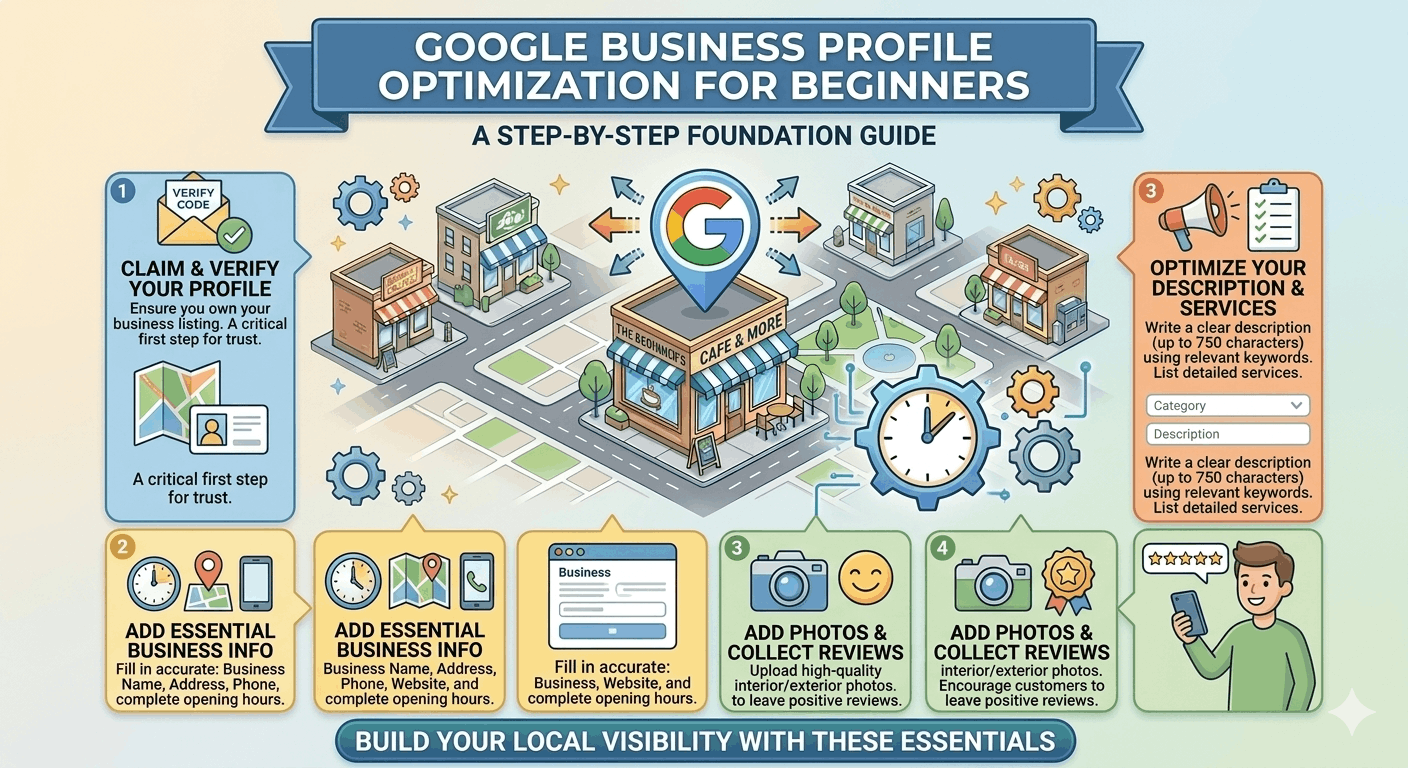

⚠️ Disclaimer: Google Business Profile features, verification methods, and ranking signals change regularly. Always check the Google Business Profile Help Centre for the most up-to-date guidance before making profile changes.
If you own a local business and you are not on Google Maps, you are invisible to the majority of nearby customers. Google Business Profile (GBP) is the free tool that puts your business on Google Maps, in the Local 3-Pack at the top of search results, and increasingly in AI-powered local recommendations from Google, ChatGPT and Gemini. And the best part — a well-optimized GBP consistently outperforms paid ads for local intent searches.
In 2026, over 60% of all Google searches have local intent. ‘Near me’ searches are growing faster than any other query type. And yet, a huge proportion of local business GBP profiles are incomplete, unverified or never updated after setup.
This guide is designed for complete beginners. You will learn exactly what GBP is, how to set it up correctly, and how to optimize every element step by step — no technical background required.
Quick Answer: How Do You Optimize a Google Business Profile?
To optimize your Google Business Profile: claim and verify your listing, complete every section of your profile, choose the most accurate primary and secondary categories, add all your services and products, upload at least 10 high-quality photos, build a review acquisition system, publish weekly Google Posts, maintain consistent NAP information across citations, and track performance monthly through GBP Insights. Completing all 10 steps puts you ahead of the majority of local businesses in your area.
| Step | Time Required | Impact | |
| 1 | Claim and verify your GBP listing | 15 min setup + 1–7 days to verify | 🔴 Must do first |
| 2 | Complete every profile section (name, address, hours, description) | 30–45 min | 🔴 Critical |
| 3 | Select the right primary and secondary categories | 15–20 min | 🔴 Critical |
| 4 | Add services and products with descriptions | 20–30 min | 🟠 High |
| 5 | Upload 10–15 high-quality photos | 20–30 min | 🟠 High |
| 6 | Collect and respond to first reviews | Ongoing | 🔴 Critical |
| 7 | Publish weekly Google Posts | 10–15 min/post | 🟠 High |
| 8 | Audit NAP consistency across citations | 30–60 min | 🟠 High |
| 9 | Create local landing page with schema | 1–3 hours | 🟠 High |
| 10 | Track performance in GBP Insights + Local Falcon | Monthly ongoing | 🟡 Ongoing |
What Is a Google Business Profile?
A Google Business Profile (previously Google My Business) is a free listing that controls how your business appears on Google Maps, Google Search, and AI-powered local recommendations. When someone searches ‘plumber near me’ or ‘café in Newtown’, the businesses that appear in the map and the box at the top of results are GBP listings.
Benefits of a fully optimized GBP:
- Appear in the Google Maps Local Pack — the 3 results shown above organic search results for local queries
- Show your business hours, phone number, reviews and photos directly in search — no click-through required
- Enable customers to call, get directions, book appointments or send messages directly from Google
- Receive a disproportionate share of local search clicks — the 3-Pack gets 44% of all clicks on local search pages
- Improve visibility in Google AI Overviews and AI tools that recommend local businesses
💡 Key insight: A fully optimized, actively managed GBP typically generates more local leads than a basic website on its own. For most local businesses, it is the single highest-ROI marketing investment available.
✅ Step 1: Claim and Verify Your Google Business Profile
You cannot optimize a GBP you don’t control. The first step is claiming ownership.
How to claim your profile:
- Go to business.google.com and sign in with a Google account.
- Search for your business name. If it already exists as an unclaimed listing, click ‘Claim this business’. If it doesn’t exist, click ‘Add your business to Google’.
- Enter your business name, category and location details.
Verification methods (Google will offer one or more):
- Postcard by mail — most common for new businesses. A postcard with a verification code arrives within 5–14 days.
- Phone call or text — a code is sent to your business phone number.
- Email verification — available for some business types.
- Video verification — Google may ask you to record a short video of your business premises and operation.
- Instant verification — available if your domain is already verified in Google Search Console.
⚠️ Do not skip verification. Unverified profiles cannot rank in Google Maps and cannot be edited publicly. Complete verification before investing time in profile optimization.
✅ If you find a duplicate or previously claimed listing for your business, use the ‘Request Access’ option to reclaim it. Do not create a second listing — duplicate profiles split your authority and can trigger suspension.
✅ Step 2: Complete Every Profile Section
A fully completed profile ranks higher than an incomplete one. Google uses profile completeness as a quality signal. Go through every available field:
Essential fields to complete:
- Business name — your exact legal or trading name. No keyword additions (e.g. ‘Joe’s Plumbing’, not ‘Joe’s Plumbing Sydney Emergency Drain Specialist’).
- Address — your full physical address or, for service-area businesses, your defined service areas with the address hidden.
- Phone number — a direct number customers can call. For multi-location businesses, a unique number per location.
- Website — link to a dedicated location landing page, not just your homepage.
- Opening hours — accurate, current hours including breaks and variations. Add holiday hours for every public holiday.
- Business description — up to 750 characters. Lead with what you do and where, then your key differentiators. Use natural language, not keyword strings.
- Opening date — add the month and year your business opened. This builds historical trust signals.
- Attributes — complete all applicable attributes for your category: payment methods, accessibility features, outdoor seating, Wi-Fi, parking, and more.
📍 Example business description (electrical contractor): ‘Smith Electrical is a licensed residential and commercial electrician serving the Inner West and Eastern Suburbs of Sydney. We specialise in switchboard upgrades, EV charger installation, and solar system wiring. Same-day service available. Call us for a free quote.’
✅ Step 3: Choose the Right Categories
Your primary category is the most important relevance signal in Google’s local algorithm. Choose the most specific available option that accurately describes your core business type.
- Primary category: search Google Maps for your core service + location (e.g. ‘electrician Parramatta’). The most common category among the top 3–5 ranked competitors is almost always the right primary choice.
- Secondary categories: add up to 9 related categories for services you genuinely offer. Each secondary category expands the range of searches your profile can appear for.
- Avoid broad parent categories (e.g. ‘Contractor’) when a specific child category exists (e.g. ‘Electrician’). The specific category always outperforms the broad one for high-intent searches.
✅ Step 4: Add Services and Products
Services and products add depth to your profile — they help Google understand exactly what you offer and allow customers to see your full range without leaving Google.
Services:
- Add every service you offer, organized by category if applicable.
- Write a 2–3 sentence description for each service explaining what it includes and who it’s for.
- Add pricing where possible — even a ‘from $X’ price range increases transparency and reduces enquiry friction.
- Include location or service type keywords naturally within service descriptions.
Products:
- Add individual products with photos, prices and short descriptions.
- Use product names that match how customers search — not internal SKU codes.
- Update product listings whenever prices change or products are discontinued.
✅ Services and products are indexed by Google — they contribute to your profile’s keyword relevance. A plumber who lists ‘Hot Water System Installation’, ‘Blocked Drain Clearing’ and ‘Gas Fitting’ as separate services will appear for more specific queries than one who only lists ‘Plumbing Services’.
✅ Step 5: Upload High-Quality Photos and Videos
Photos are one of the first things potential customers see in your GBP listing. Profiles with more, higher-quality photos receive more clicks, calls and direction requests.
| Photo Type | What to Show | Technical Spec |
| Logo | Your brand mark on a clean background | 250×250px minimum; PNG preferred |
| Cover photo | Best representation of your business — team, storefront or hero product | 1024×575px; avoid text-heavy graphics |
| Exterior | Storefront showing street number and signage; daytime and nighttime | 720×540px minimum; well-lit |
| Interior | Reception, seating, workspace or showroom — shows the experience | 720×540px minimum |
| Team photos | Staff at work; individual headshots for practitioners | Natural, candid preferred over posed |
| Service / Product | Work in progress, completed projects, products on display | Before-and-after format performs best for services |
| Video | 30–60 second profile video: walkthrough, team intro, service process | Under 75MB; MP4 format |
- Aim for 10–15 photos at setup. Add 3–4 new photos per month ongoing.
- Geotag your photos with your business coordinates using a free tool like GeoImgr before uploading — this reinforces your location signal.
- Never use stock photos — Google and customers can identify them, and they reduce trust.
✅ Businesses with 100+ photos get significantly more website clicks and direction requests. This is a free, high-impact optimization that most competitors neglect. Start uploading consistently from day one.
✅ Step 6: Build a Review Strategy
Reviews are the most visible trust signal in Google Maps and one of the strongest local ranking factors. You need a consistent, ethical process for acquiring them.
How to ask for reviews:
- Ask at the peak satisfaction moment — immediately after a completed job, appointment or purchase.
- Create a direct Google review shortlink and share it via SMS, email, or QR code.
- Train every customer-facing team member to make a verbal review request at the end of each interaction.
- Follow up once via SMS or email within 72 hours if the customer hasn’t left a review yet.
Responding to reviews:
- Respond to every review — positive and negative — within 48 hours.
- For positive reviews: thank the customer by name, mention the specific service, and include your location naturally.
- For negative reviews: acknowledge the issue calmly, apologise for their experience, and take the conversation offline.
⚠️ Never buy, fake or incentivise reviews — this violates Google’s guidelines and can result in profile suspension. Only ask real customers who have genuinely used your service.
✅ Step 7: Use Google Posts and Q&A
| Post Type | Best Used For | Recommended CTA |
| Offer | Discounts, promotions, limited-time deals — shows badge in Maps | ‘Claim Offer’, ‘Book Now’, ‘Get a Quote’ |
| Event | Open days, webinars, community events, seasonal campaigns | ‘Register’, ‘Learn More’, ‘Get Tickets’ |
| Update | News, tips, staff highlights, service spotlights, project showcases | ‘Learn More’, ‘Call Us’, ‘Visit Website’ |
Posting frequency: minimum 1 post per week. Posts without an end date display for 7 days. Consistent posting signals an active, customer-focused business to Google’s algorithm.
Q&A best practices:
- Seed your Q&A section with 5–8 common customer questions and answer them yourself.
- Use service and location keywords naturally in your answers.
- Check the Q&A section monthly — anyone can answer your questions, including competitors.
✅ Step 8: Optimize for Local SEO
Your GBP works best when it is supported by strong local SEO signals from your website.
NAP consistency:
Your business Name, Address and Phone number must be identical across your GBP, website, Facebook, Yelp, Apple Maps, Yellow Pages and every other directory where you are listed. Even minor inconsistencies (Street vs St, Suite vs Ste) create trust signal conflicts.
Local landing page:
Link your GBP to a dedicated location page on your website — not just your homepage. The URL should follow the format: yoursite.com/locations/suburb-name. This page should include your address, phone, hours, services, an embedded Google Map and LocalBusiness schema.
LocalBusiness schema:
Schema markup is structured code that helps Google understand your business entity. Add LocalBusiness (or your specific business subtype) schema to your location page, including: business name, address, phone, coordinates, hours and aggregateRating. Most website platforms have schema plugins, or you can use Google’s Structured Data Markup Helper.
Local citations:
Build consistent listings on the top local directories: Apple Maps, Bing Places, Yelp, Yellow Pages, True Local, Hotfrog, Facebook. This broadens your entity footprint and reinforces your NAP data across the web.
✅ Step 9: Optimize for AI Search
In 2026, AI-powered search tools are a growing source of local business recommendations. Here’s how to ensure your GBP is AI-ready:
Entity completeness:
AI tools like Google AI Overviews, ChatGPT, Gemini and Perplexity pull your business data from GBP, your website, schema markup and third-party directories. Every data point must be consistent and complete — name, category, services, location, hours and reviews all feed into how AI tools classify and recommend your business.
AEO (Answer Engine Optimization):
Structure your website content and GBP Q&A to directly answer the most common questions customers ask about your business type. Use FAQPage schema on your location page. AI tools frequently cite businesses whose content directly and clearly answers specific local queries.
GEO (Generative Engine Optimization):
Build a consistent entity footprint across GBP, your website, citations and social profiles. The more consistent your entity data is across all platforms, the higher your confidence score in AI knowledge graphs — and the more likely AI tools are to recommend you.
💡 Key insight: For beginners, the best AI search optimization is completing Steps 1–8 thoroughly. A fully complete, consistently maintained GBP is already significantly better optimized for AI search than most local businesses.
✅ Step 10: Monitor Performance and Improve
Setting up and optimizing your GBP is not a one-time task. Monitor these metrics monthly to track progress and identify where to focus next:
| Metric | What It Means | Where to Find It |
| Search impressions | How often your profile appeared in Google Search or Maps | GBP Insights > Search |
| Website clicks | Customers who clicked through to your website | GBP Insights / GA4 with UTM |
| Phone calls | Direct calls initiated from your GBP listing | GBP Insights / CallRail |
| Direction requests | Customers who clicked ‘Get directions’ to your location | GBP Insights |
| Photo views | Engagement with your images — a freshness signal | GBP Insights > Photos |
| Local Pack rank | Your position in Google Maps for target keywords | Local Falcon geo-grid |
| Review growth | New reviews per month — review velocity metric | GBP dashboard / BrightLocal |
Recommended beginner tool stack (all free or low-cost):
- GBP Insights (free) — native dashboard for calls, clicks, directions, photos and search queries
- Google Search Console (free) — local keyword impressions and click-through rates
- Google Analytics 4 (free) — track GBP-sourced website traffic with UTM parameters
- Local Falcon (from $24/mo) — geo-grid Maps rank tracking to see your position across your area
Common Beginner GBP Mistakes
| Mistake | Why It Hurts | How to Fix It |
| Keyword stuffing business name | GBP suspension risk | Use exact trading name only |
| Choosing wrong primary category | Misses most high-intent local queries | Benchmark against top 3 local competitors |
| Ignoring reviews (not responding) | Signals inactivity; reduces trust | Respond to every review within 48 hours |
| Inconsistent business information | NAP mismatches suppress local rankings | Run a citation audit; fix mismatches |
| Linking to homepage (not location page) | Wastes the most valuable local signal | Link to a dedicated location landing page |
| Never posting or uploading photos | Profile looks inactive; loses ranking ground | Schedule weekly posts and monthly photo uploads |
| Buying fake reviews | Profile suspension; trust damage | Only ask real customers via ethical methods |
Beginner’s GBP Optimization Checklist
Setup & Verification:
- ☑ GBP claimed and fully verified
- ☑ Business name matches exact legal/trading name — no keyword additions
- ☑ Address or service area correctly configured
- ☑ Unique direct phone number added
- ☑ Website linked to dedicated location page
Profile Completion:
- ☑ Primary category: most specific available option matching core business
- ☑ Up to 9 secondary categories added for real services
- ☑ Business description written (750 chars): service + location + differentiators
- ☑ Opening hours accurate including holiday hours
- ☑ All applicable attributes completed
- ☑ Opening date added
Content & Media:
- ☑ 10–15 photos uploaded: logo, cover, exterior, interior, team, service
- ☑ All services listed with descriptions
- ☑ Products added with photos and pricing where applicable
- ☑ 5–8 Q&A entries seeded with keyword-rich answers
- ☑ First Google Post published
Reviews & Engagement:
- ☑ Direct review link created and distributed to team
- ☑ Review request process implemented (SMS/QR code/email)
- ☑ All existing reviews responded to
Website & Technical:
- ☑ Dedicated location landing page live with unique URL
- ☑ LocalBusiness schema implemented on location page
- ☑ NAP consistent across top 10 citation directories
- ☑ GA4 UTM tracking active on GBP website link
Ongoing (recurring):
- ☑ 1–2 Google Posts published per week
- ☑ 3–4 new photos uploaded per month
- ☑ All reviews responded to within 48 hours
- ☑ GBP Insights reviewed monthly
Real-World Beginner Example: Mobile Dog Grooming Business
Business: Wagtime Mobile Grooming — solo operator serving the northern suburbs of Melbourne.
Initial state: Unclaimed GBP listing with no photos, no description, primary category set to ‘Pet Supply Store’ (incorrect — this was a mobile service), and 2 reviews with no responses.
Optimization actions taken (Week 1–4):
- Claimed and verified the profile via video verification.
- Updated primary category to ‘Dog Groomer’ — changed from ‘Pet Supply Store’.
- Added secondary categories: ‘Pet Groomer’, ‘Mobile Grooming Service’.
- Configured as a service-area business — hid home address and defined 18 suburbs as service areas.
- Wrote a 680-character business description highlighting mobile convenience, breed specialisations and service areas.
- Added 7 services with descriptions and pricing (puppy groom, full groom, wash and dry, etc.).
- Uploaded 14 photos: before-and-after grooms (8), van exterior (2), equipment (2), owner headshot (2).
- Responded to both existing reviews with personalised, keyword-inclusive replies.
- Sent review request SMS to 20 past clients with direct review link.
- Published first Google Post: ‘Booking for summer now open — click to secure your dog’s grooming appointment.’
Results at 60 days:
- Profile impressions in Maps: 0 → 430 per month
- Inbound calls from GBP: 0 → 18 per month
- Direction requests: 0 → 24 per month (customers checking service area before booking)
- Reviews: 2 → 19 (average 4.9 stars)
- Ranking in top 3 of Google Maps for ‘mobile dog grooming’ across 12 of the 18 defined suburbs
✅ Key lesson: The single biggest change was fixing the primary category from ‘Pet Supply Store’ to ‘Dog Groomer’. This one change unlocked the profile’s eligibility for the most common high-intent search queries for this business type.
Frequently Asked Questions for GBP Beginners
1. Is Google Business Profile free?
Yes — creating, claiming and managing a Google Business Profile is completely free. There is no cost to appear in Google Maps or the Local 3-Pack. Google does offer paid advertising options (Local Services Ads) as a supplement to organic GBP visibility, but these are optional.
2. How long does it take for my GBP to appear in Google Maps?
Once verified, your profile should appear in Google Maps within 24–72 hours. Ranking in the Local Pack for competitive keywords typically takes 4–12 weeks of consistent optimization — category selection, reviews and photo uploads are the fastest-impact early actions.
3. What is the difference between Google Business Profile and Google Maps?
Google Business Profile is the backend management tool where you edit your listing. Google Maps is the public-facing product where customers find and view your listing. When you optimize your GBP, you are improving how your business appears in Google Maps and Google Search results.
4. Do I need a website to have a Google Business Profile?
No — you can create and verify a GBP without a website. However, having a website linked from your GBP significantly improves your ranking potential and conversion rate. Even a basic single-page website with your services, address and contact information is better than no website at all.
5. Can I have a GBP if I work from home?
Yes, but with restrictions. If you serve customers at your location (they come to you), you can list your home address. If you serve customers at their location (you go to them), set up as a service-area business and hide your home address — this is the most common setup for mobile businesses and sole traders.
6. How many Google reviews do I need to rank well?
There is no magic number — it depends on your local competition. Research the top 3–5 ranked businesses for your target search term and match their review count. In most markets, 15–30 reviews is enough to become competitive. Recency matters as much as quantity.
7. What should I do if I have two GBP listings for the same business?
Do not ignore it — duplicate listings split your review authority and can trigger suspension. If you own both, remove the less established one or merge them. If the second listing is unclaimed, claim it and then request that Google remove it as a duplicate.
8. Can my competitors edit my Google Business Profile?
Anyone can suggest an edit to your GBP — and Google sometimes applies suggested edits automatically. Set up GBP notifications in your dashboard and check weekly for any unapproved changes. Always confirm that your profile information is correct after any Google update.
9. What is the best way to get more Google reviews as a beginner?
Create a direct review link and share it via SMS with your last 20–30 customers. Train your staff to ask verbally at the end of every interaction. Print QR codes on invoices, receipts and business cards. A polite, direct ask at the right moment converts at 20–40% — the bottleneck is usually not customer willingness but business owner hesitation to ask.
10. Do I need to hire an SEO agency to optimize my GBP?
Not necessarily for the basics. Following the 10 steps in this guide will put you ahead of the vast majority of local competitors. An SEO agency adds value when you need advanced citation building, geo-grid rank tracking, review management systems, multi-location management, or ongoing monthly reporting and optimization — typically when you have 3+ locations or operate in highly competitive markets.
Conclusion: Your GBP Is Ready — Now Keep It Active
A fully optimized Google Business Profile is one of the most powerful — and most underused — local marketing tools available to any small business. Following the 10 steps in this guide puts you ahead of the majority of local competitors before you have spent a single dollar on advertising.
Key takeaways:
- Verification is non-negotiable — an unverified profile cannot rank.
- Category selection is the single highest-leverage decision you will make for local visibility.
- Reviews are your most controllable ranking lever — ask every customer, respond to every review.
- Photos, posts and Q&A make your profile feel active — Google rewards activity with visibility.
- Link your GBP to a dedicated local landing page, not your homepage.
- AI search tools use your GBP data — a complete, consistent profile benefits every search channel.
- This is a process, not a project — the businesses that rank consistently are the ones that never stop optimizing.
Take 30 minutes today to audit your current GBP against the checklist in this guide. Most businesses find at least 3–5 quick wins they can implement immediately — and those quick wins can produce measurable ranking improvements within weeks.