Your GBP Is Becoming an AI Overview: What to Fix on Your Location Pages
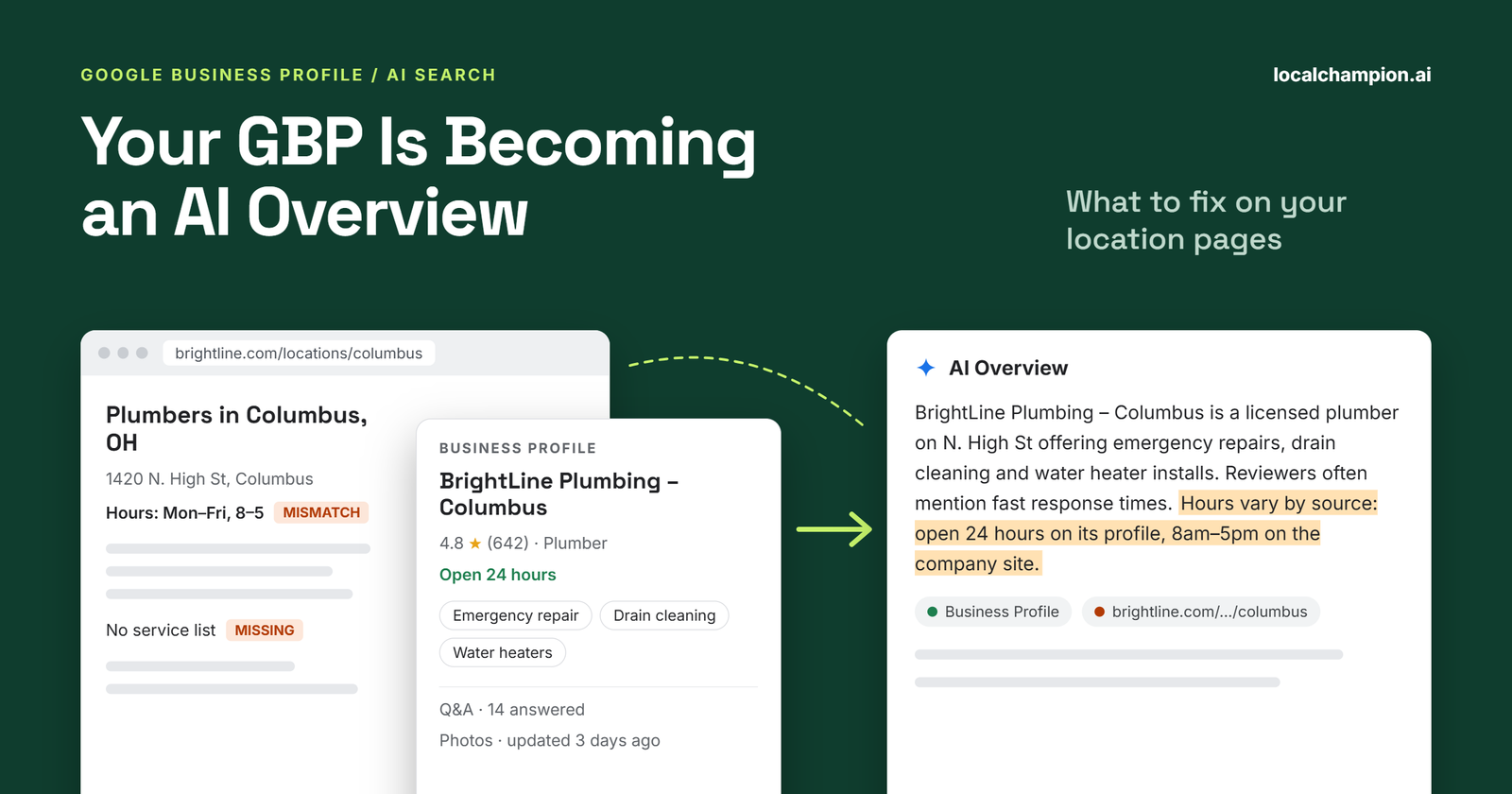

Google has been seen showing an AI-generated summary at the top of a business’s own knowledge panel, labeled “AI Overview.” When Search Engine Roundtable’s Barry Schwartz checked the one for his own company, he noticed part of it was outdated, and traced that to old content on his website (Search Engine Roundtable). That’s the core lesson for local businesses: AI summaries can reflect what your website says, not only your Google Business Profile.
So what should you fix? Start with your location pages. Make each one accurate, consistent with its Business Profile, specific to that location, and easy to crawl. Answer the questions customers actually ask, keep services and hours current, and add structured data that matches what’s visible on the page.
Picture a customer searching “pediatric dentist open Saturday near me.” Before they open a single website, they may read an AI-generated answer that names a few clinics and summarizes what each offers. If your location page says nothing about Saturday hours or pediatric care, you’ve given Google less to work with than the clinic down the road.
In short: Google’s AI features, including AI Overviews, draw on Google’s core Search systems and indexed web content, and Google says up-to-date Business Profile information helps businesses appear in AI responses. Your Business Profile and your location pages should work as a matched pair: the profile supplies core facts, and the page supplies the depth customers need to decide. No technique guarantees inclusion in an AI Overview.
How AI Overviews Are Changing Local Search
AI Overviews are AI-generated summaries that appear in some Google Search results, with links to supporting web pages. Google says its generative AI features are rooted in its core Search ranking and quality systems. They retrieve relevant, up-to-date pages from Google’s index, a process known as grounding, and may run several related searches behind the scenes, called query fan-out (Google Search Central).
AI Overviews are one of several local surfaces, and each works differently:
| Surface | What it shows | Main source |
| AI Overview | An AI-generated summary with supporting links | Google’s index of web pages, plus other Google data |
| AI Mode | A conversational AI response for follow-up questions and comparisons | Same core systems; may use different models and show different links |
| Local pack | A map with a short list of businesses in Search | Google Business Profile and Maps data |
| Google Maps | A full list of places and a map | Business Profile and Maps data |
| Organic results | Links to web pages | Google’s web index |
What’s changing for local businesses
Google describes AI Mode as built for nuanced questions and comparisons, the kind customers ask about services, availability, price and suitability. AI features can answer those questions by drawing on several sources at once, which means your website content can shape how a business is described, not just whether it ranks.
Google’s guide to generative AI search says that, where appropriate, AI responses can include information about local businesses, and that Google Business Profiles can help businesses be visible in AI responses (Google Search Central).
On the Business Profile side, Google has been seen testing an “AI Overview” label at the top of a business’s own local panel, with a “Show more” button that opens an AI Mode-style chat. Industry consultant Ben Fisher first spotted it, and Search Engine Roundtable replicated it on September 17, 2026 (Search Engine Roundtable). It’s an observed test, not a confirmed global rollout.
What AI Overviews don’t do
- They don’t appear on every search. Google says AI Overviews show only when its systems judge them additive to classic Search, and they often don’t trigger (Google Search Central).
- They don’t replace Business Profiles. The local pack, Maps and the profile itself still exist alongside AI features.
- They don’t guarantee inclusion. Google states there are no additional requirements or special optimizations for AI Overviews, and that meeting every best practice doesn’t guarantee a page will be crawled, indexed or shown.
To be eligible as a supporting link, a page must be indexed and eligible to appear in Search with a snippet. That’s the same bar as regular Search, which is why location page fundamentals matter.
Why Your Google Business Profile and Location Pages Must Work Together
A Google Business Profile is the business listing Google shows in Search and Maps: name, address, phone, hours, categories, reviews and photos. A location page is the page on your own website for one branch. Each does a different job:
| Google Business Profile | Location page | |
| Main job | Core facts in Search and Maps | Depth that helps customers decide |
| Who controls it | You, plus Google updates and user suggestions | You |
| Room for detail | Limited fields and character counts | As much as customers need |
| Best for | Hours, address, phone, category, reviews | Services, team, facilities, policies, FAQs, booking details |
Why consistency matters
When the two disagree, customers don’t know which to trust. Google also uses public information to decide what to show. Its help documentation says that if an owner doesn’t respond to a suggested edit within 4 days, Google may publish it if it’s supported by other publicly available information, such as the business website (Google Business Profile Help). An outdated location page can therefore end up backing the wrong information.
Hypothetical example: the missing service
A physiotherapy franchise adds “sports injury rehabilitation” to the Business Profile services for its Indiranagar clinic. The clinic’s location page still uses the national template, which lists only general physiotherapy and post-surgery rehab.
A customer asks Google about sports injury physio nearby. The profile suggests the clinic offers it, but the clinic’s own page gives no detail about the service, the physiotherapist who leads it, or how to book. A competing clinic whose page explains its sports rehab program in plain language gives searchers, and Google, a much clearer answer.
The fix is simple: add a short section to the location page covering the service, who delivers it and how to book.
Consistent information is good practice for customers and for trust. It isn’t a guarantee of AI Overview visibility.
The Location Page Elements You Should Fix First
These seven fixes follow Google’s documented SEO fundamentals, which Google says apply equally to its AI features. None of them guarantees an AI Overview citation. All of them make the page more useful.
1. Make the business identity and location clear
- Use a descriptive H1 that names the business and location, such as “YourBrand Dental, Koramangala.” Avoid stuffing it with keywords.
- Show the correct business name, full address and local phone number, matching the Business Profile. Google’s guidelines say the profile name should match the real-world name used on your storefront and website (Google Business Profile Help).
- Say clearly whether customers visit you, you travel to them, or both.
- Mention the city or neighborhood where it helps a reader, not in every sentence.
2. Add location-specific content that can’t be reused everywhere
Google’s spam policies list “pages targeted at specific regions or cities that funnel users to one page” as an example of doorway abuse (Google Search Central). Google’s AI search guide also warns against mass-producing pages for every query variation.
Give each page facts only that location can supply:
- Services available at this branch, and any that aren’t
- Team members, qualifications or specialisms, with their permission
- Facilities, accessibility, parking and appointment information
- Areas served, where relevant
- Practical guidance for customers visiting this location
- Original photos of the premises and team
Never invent neighborhood references, local projects, testimonials or awards. Everything on the page should be verifiable.
3. Answer the questions customers actually ask
Add short sections that answer real questions, with the answer directly under each heading:
- What services does this location offer?
- Where exactly is it, and where do I park?
- What are the opening hours, including holidays?
- Do you serve my area?
- How do I book, and how soon can I be seen?
- What should I bring or know before my visit?
Use the questions your phone staff and front desk hear most often. Google says there’s no need to “chunk” content or write in a special way for AI systems, so write for the customer. Clear answers help readers either way, even though they don’t guarantee Google will quote them.
4. Keep services, pricing and availability accurate
- List only services genuinely offered at that location.
- Publish prices or price ranges where you can state them accurately.
- Explain when a quote or consultation is needed.
- Keep booking links, appointment instructions and availability current.
- Point out meaningful differences between branches.
Don’t publish unsupported or placeholder prices to look complete. Wrong information hurts customers and can be repeated back to them.
5. Add relevant structured data
Structured data is code that labels page information, such as a business’s name, address and hours, in a standard format search engines can read. For location pages, use LocalBusiness or the most specific supported subtype, such as Dentist or Restaurant. Include accurate name, address, telephone, URL, opening hours and coordinates where available (Google Search Central).
Make sure the markup matches what’s visible on the page. Validate it with Google’s Rich Results Test and the Schema Markup Validator.
Keep expectations realistic. Google says structured data isn’t required for its generative AI features and there’s no special schema to add for them, though it remains useful for rich result eligibility (Google Search Central).
6. Improve internal linking and page discoverability
- Link every location page from a central store locator or locations page.
- Link location pages to relevant service pages, and back.
- Use normal, crawlable HTML links, not links that only appear after a script runs or a form is submitted.
- Use descriptive anchor text, such as “Koramangala clinic” rather than “click here.”
- Avoid orphaned pages and duplicate URLs for the same location.
Google lists findability through internal links among the SEO basics that continue to matter for AI features (Google Search Central).
7. Strengthen page experience and mobile usability
- Make pages load quickly, with compressed images.
- Design for mobile first, since customers often check location details on their phones.
- Put tap-to-call and booking buttons where they’re easy to find.
- Use readable text, clear navigation and accessible design.
- Serve every page over HTTPS.
These are usability and technical SEO basics. No single page speed score guarantees rankings or AI citations.
What Multi-Location Brands Should Do Differently
At 10 locations, a marketer can check every page by hand. At 500, you need a system. The goal is consistency where it matters and genuine local detail everywhere else.
- Use templates with room for local facts. Fix the layout and brand elements, but build in required fields for branch-specific services, team, facilities and FAQs.
- Govern core data centrally. Keep one approved record for each location’s name, address, phone, hours and services, and feed both the Business Profile and the location page from it.
- Verify branch facts locally. Ask each location manager to confirm services, hours and facilities on a set schedule.
- Map every profile to one page. Each Business Profile should link to its own location page, and each page should match that profile.
- Assign clear ownership. Decide who updates hours, services and contact details, and who approves new content.
- Run quality checks at scale. Flag pages with missing fields, duplicate copy, broken booking links or data that doesn’t match the profile.
- Don’t build doorway pages. Avoid creating pages for every nearby suburb when there’s no distinct location or service to describe there.
Hypothetical example: one template, two real locations
A national veterinary chain uses the same template for every clinic. The header, brand messaging, booking widget and core service descriptions are identical and centrally approved.
Below that, each page has required local fields. The city-center clinic lists its 24-hour emergency service, paid parking nearby and an exotic pets specialist. The suburban clinic lists free on-site parking, weekday hours only, a cat-friendly waiting room and that emergencies are referred to the city clinic.
Both pages look and feel like the same brand. Each still answers the questions a nearby pet owner would actually ask, and each matches its own Business Profile.
How to Audit Your Location Pages for AI Search Readiness
- Export every active location and its Business Profile from your profile manager.
- Map each profile to its location page. Flag profiles that link to the homepage or a wrong page.
- Compare core data. Check name, address, phone, hours and services between each profile and its page.
- Check for genuine local content. Flag pages that differ only by city name.
- Find unanswered questions. List what customers ask staff that the page doesn’t answer.
- Check technical access. Confirm each page is indexable, has a correct canonical tag, is linked with crawlable HTML links and appears in the XML sitemap. Google’s current AI search guide also says a site must be included in Search generative AI features in Search Console to be eligible, so check that setting (Google Search Central).
- Validate structured data and confirm it matches visible content.
- Test on mobile, including load speed and tap targets.
- Review internal links and calls to action.
- Set up measurement: organic performance, relevant queries, conversions and any available AI visibility data.
AI Overview appearances aren’t always easy to observe. Results vary by user, location and time, so a handful of manual checks proves little. Use a fixed sample of queries, check them on a set schedule, and write down how you measure.
Location Page SEO Checklist for Google AI Overviews
- ☐ Clear, location-relevant H1
- ☐ Accurate business name and location details
- ☐ Current services and opening hours
- ☐ Unique, useful content for each location
- ☐ Direct answers to important customer questions
- ☐ Accurate pricing and booking information where relevant
- ☐ Relevant, validated structured data that matches the page
- ☐ Crawlable internal links and indexable URLs
- ☐ Mobile-friendly layout with easy-to-use calls to action
- ☐ Business Profile and website information match
- ☐ No fabricated local claims or mass-produced doorway pages
- ☐ Regular content and data audits on a set schedule
How to Measure Success Beyond AI Overview Visibility
An AI Overview citation is a nice signal, but it isn’t the goal. Customers are. Track:
- Search Console impressions, clicks and click-through rate for location pages. Google says appearances in AI features are included in Search Console’s performance data, and its current guide points to a Generative AI performance report (Google Search Central).
- Relevant queries, both local and service-related
- Organic visits to location pages
- Calls, bookings, direction requests and enquiries
- Engagement and lead quality, not just volume
- Business Profile performance data, such as calls, website clicks and direction requests
- AI Overview appearances and citations, where you can observe them reliably
These datasets don’t connect perfectly. A rise in calls may come from seasonality, ads or a competitor closing. Treat trends as evidence, not proof, and don’t expect any single fix to deliver a guaranteed traffic increase.
What to Do Next
- Fix inaccurate or conflicting business information first.
- Rewrite thin or duplicated location pages.
- Answer the most common customer questions on each page.
- Validate technical SEO and structured data.
- Set up a repeatable process for managing location-level content.
- Measure business outcomes and review performance regularly.
Conclusion: Build Location Pages That Help Customers and Search Engines
A well-managed Google Business Profile gives Google and customers the essential facts. A strong location page adds the detail people need to choose: what this branch offers, who works there, what it costs and how to book. As AI features summarize more of that information, the two need to tell the same accurate story.
Skip the shortcuts. Google itself says there’s no special AI file, schema or writing style required. Focus on accuracy, relevance, accessibility and real local value.
Want help aligning your Business Profiles and location pages? Explore Local Champion’s Google Business Profile optimization services or contact the team to improve your local search presence.
SEO Metadata
| Element | Recommendation |
| SEO title (55 chars) | Local Landing Page Optimization for Google AI Overviews |
| Meta description (~154 chars) | Google’s AI Overviews can reflect your website, not just your GBP. Learn what to fix on location pages: accuracy, local content, FAQs and structured data. |
| URL slug | /blog/local-landing-page-optimization-ai-overviews/ |
| H1 | Your GBP Is Becoming an AI Overview: What to Fix on Your Location Pages |
| Primary keyword | local landing page optimization |
| Secondary keywords | Google Business Profile optimization, AI Overviews local SEO, local SEO landing pages, location page SEO, multi-location SEO, AI search optimization, local business schema markup, Google Maps visibility, location-specific content, local search visibility, Answer Engine Optimization (AEO), Generative Engine Optimization (GEO), local business information accuracy, service area landing pages |
H1 note: “Your GBP Is Becoming an AI Overview” describes an observed Google test, not a confirmed rollout. The article says so in the first section. If you want a safer H1, consider “Google Is Testing AI Overviews on Business Profiles: What to Fix on Your Location Pages.”
H2/H3 headings used: How AI Overviews Are Changing Local Search (H3s: What’s changing for local businesses · What AI Overviews don’t do) · Why Your Google Business Profile and Location Pages Must Work Together (H3s: Why consistency matters · Hypothetical example: the missing service) · The Location Page Elements You Should Fix First (H3s 1–7) · What Multi-Location Brands Should Do Differently · How to Audit Your Location Pages for AI Search Readiness · Location Page SEO Checklist for Google AI Overviews · How to Measure Success Beyond AI Overview Visibility · What to Do Next · Conclusion
FAQs
Does my Google Business Profile affect AI Overviews?
Google says that, where appropriate, AI responses can include local business information, and that Google Business Profiles can help businesses be visible in AI responses and other Search results. Google doesn’t publish which profile fields matter or how much. Keep your profile complete and accurate, and make sure your website says the same thing.
Do I need special schema markup to appear in AI Overviews?
No. Google says there’s no special schema.org markup needed for its generative AI features, and structured data isn’t required for them. LocalBusiness structured data is still worth adding to location pages because it helps search engines understand your details and supports rich result eligibility, as long as it matches visible content.
Can I guarantee my location page appears in an AI Overview?
No. Google says there are no additional requirements or special optimizations for AI Overviews, and that meeting every best practice doesn’t guarantee crawling, indexing or display. AI Overviews also don’t appear on every search. Focus on accurate, useful, crawlable location pages, which help customers whether or not an AI Overview cites you.
What’s the difference between AEO, GEO and SEO?
AEO (answer engine optimization) and GEO (generative engine optimization) are industry terms for improving visibility in AI search experiences. Google says that, from its perspective, optimizing for generative AI search is still SEO. The same fundamentals apply: helpful content, technical accessibility and accurate business information.
How do I stop thin, duplicated location pages at scale?
Use a shared template with required local fields, such as services offered, team, facilities and FAQs. Feed core data from one approved source, ask local managers to verify branch facts, and flag pages that differ only by city name. Google’s spam policies treat city-targeted pages that offer no distinct value as doorway abuse.