How to Rank Higher on Google Maps: The Complete 2026 Guide

If your business isn’t showing up in the top three results on Google Maps, you are invisible to the majority of local buyers. In 2026, over 60% of all Google searches have local intent, ‘near me’ queries are growing faster than any other search type, and Google Maps results appear before organic listings in nearly every local search. The three businesses in the Local Pack capture the vast majority of clicks, calls and in-store visits — everything below that gets a fraction of the attention.
AI-powered search experiences are accelerating this trend. Google AI Overviews, ChatGPT, Gemini and Perplexity all surface local business recommendations — and they pull from the same data layers that Google Maps uses.
This guide gives you a complete, step-by-step Google Maps SEO strategy that covers every ranking lever — from your Google Business Profile to reviews, citations, backlinks, website authority and engagement signals.
Quick Answer: How Do You Rank Higher on Google Maps?
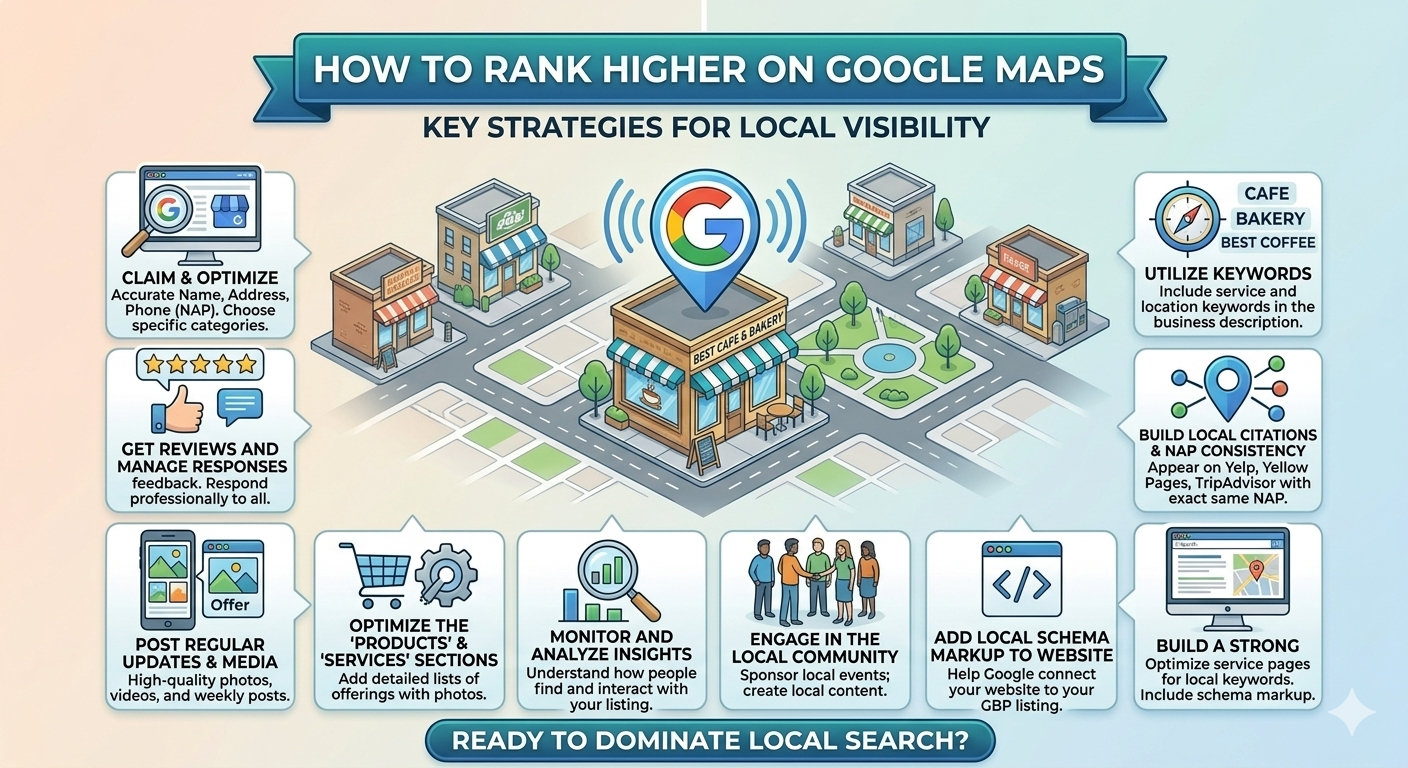
To rank higher on Google Maps: fully optimize your Google Business Profile (claim, verify, complete every field), select the most accurate primary category, build a consistent stream of high-quality reviews, maintain identical NAP information across all citations, earn locally relevant backlinks, improve your website’s local authority, and generate strong engagement signals (calls, clicks, directions). Google combines relevance, distance and prominence to determine which businesses appear — and most of the controllable factors sit in the prominence pillar.
| Ranking Signal | What Google Evaluates | Impact Level |
| GBP Completeness | Verified, fully completed profile with all fields populated | 🔴 Critical |
| Primary Category | Accuracy and specificity of chosen category | 🔴 Critical |
| Review Quantity | Total number of GBP reviews | 🔴 Critical |
| Review Quality | Average star rating, recency, keyword-rich text | 🔴 Critical |
| Review Responses | Response rate and speed to all reviews | 🟠 High |
| NAP Consistency | Exact match of Name, Address, Phone across all citations | 🟠 High |
| Website Authority | Domain authority, local backlinks, technical SEO | 🟠 High |
| Local Landing Pages | Unique, schema-rich location pages on your website | 🟠 High |
| Engagement Signals | Clicks, calls, directions, photo views, messages | 🟡 Moderate |
| Google Posts | Post frequency and engagement rate | 🟡 Moderate |
| Photos & Videos | Volume, quality and recency of media | 🟡 Moderate |
| Q&A Optimization | Seeded questions answered with local keywords | 🟢 Supporting |
| Proximity | Searcher’s distance from business location (uncontrollable) | 🟠 High |
How Google Maps Rankings Work
Google’s local ranking algorithm uses three core signals to decide which businesses appear in the Local Pack and Google Maps results:
1. Relevance
Does your business match what the searcher is looking for? Your primary category is the strongest relevance signal. The keywords in your business description, service listings, review text and Q&A responses all contribute to how Google understands what you offer.
2. Distance
How close is your business to the searcher’s location, or the location they specified in the query? You cannot control distance — but service-area businesses can define geographic coverage areas, and dedicated location landing pages help businesses rank in nearby suburbs.
3. Prominence
How well-known, trusted, and authoritative is your business across the web? This is the pillar you can control most. Review volume, star rating, response rate, backlinks, citations, website authority and engagement signals all feed your prominence score.
💡 Key insight: Relevance and prominence are fully within your control. Focus your optimization effort there, rather than trying to compete on distance in areas where you don’t physically operate.
Claim and Fully Optimize Your Google Business Profile
Your Google Business Profile is the single most important local SEO asset you own — and it is free. An incomplete or unclaimed profile is the most common reason local businesses fail to appear in the Local Pack.
| GBP Optimization Task | Why It Matters | |
| ☑ | Claim and verify your GBP listing | Unverified profiles cannot rank |
| ☑ | Use exact legal or trading business name — no keywords | Keyword stuffing triggers suspension |
| ☑ | Select the most specific, accurate primary category | #1 relevance signal — choose carefully |
| ☑ | Add up to 9 secondary categories | Broadens your query surface area |
| ☑ | Write a keyword-rich description (750 chars max) | Communicates services and location to Google |
| ☑ | List all services with descriptions and pricing | Feeds Google’s understanding of your offering |
| ☑ | Add products with photos and prices where relevant | Increases profile richness and engagement |
| ☑ | Complete all applicable attributes | Improves relevance for attribute-specific searches |
| ☑ | Set accurate opening hours including holiday hours | Prevents ‘Hours may differ’ warnings |
| ☑ | Add appointment or booking links | Reduces friction; boosts conversion signals |
| ☑ | Upload 10+ photos: logo, cover, interior, exterior, team | Profiles with 100+ photos get far more clicks |
| ☑ | Link to a unique location landing page (not the homepage) | Strengthens local relevance signal |
✅ After completing your profile, check it from a private browser window searching your primary service + location (e.g. ‘plumber Newtown’) to see exactly how your profile appears in Maps before and after optimization.
Build a Strong Review Strategy
Reviews are the most controllable and highest-impact prominence signal. They influence your Maps ranking directly and your click-through rate from Maps results indirectly — a 4.8-star business will always draw more clicks than a 3.9-star competitor, even from the same position.
What matters most:
- Quantity — aim to consistently outpace your top three local competitors on review count.
- Recency — reviews from the last 90 days carry significantly more weight than older reviews. A business with 10 reviews this month often outranks one with 100 reviews from two years ago.
- Star rating — maintain above 4.2 stars. Below 4.0, your click-through rate drops sharply regardless of ranking position.
- Velocity — a steady cadence of 4–8 new reviews per month signals consistent customer activity. Avoid sudden spikes (mass requests from your email list), which can trigger Google’s spam filters.
- Keywords in reviews — when customers naturally mention your service and location in their review text, it reinforces your relevance for those query terms.
- Responses — respond to every review within 48 hours. Response rate is a tracked engagement signal. Include your primary service keyword and location naturally in positive review responses.
Ethical review acquisition tactics:
- Ask at the peak satisfaction moment — immediately after a completed job, appointment, or sale.
- Send a direct Google review link via SMS or email — never make customers search for your business.
- Print QR codes on invoices, receipts, and business cards linking directly to your review form.
- Train all customer-facing staff to make a verbal review request at the close of every interaction.
⚠️ Never offer incentives (discounts, gifts, cash) for reviews — this violates Google’s guidelines and the FTC’s endorsement rules. Never review-gate by only asking satisfied customers. Both practices risk profile suspension.
Maintain NAP Consistency
NAP stands for Name, Address, Phone number — the three data points that Google uses to verify your business identity across the web. Inconsistencies between your GBP and your website, social profiles, directories and data aggregators create trust signals that suppress your local rankings.
| Element | Common Mistake | Correct Approach |
| Name | ‘Joe’s Plumbing Sydney Drain Specialist’ | ‘Joe’s Plumbing’ — exact trading name only |
| Address | ‘Suite 2, 123 George St’ on GBP vs ‘123 George St Ste 2’ on Yelp | Identical format across every citation |
| Phone | Different number on GBP vs website vs Facebook | Same direct or tracked number in all listings |
| Website URL | Linking to homepage on some citations, location page on others | Consistent URL — ideally unique location page |
| Business Hours | Different hours listed on GBP, website and Yelp | Identical hours updated simultaneously across platforms |
Where to maintain NAP consistency:
- Google Business Profile (primary source of truth)
- Your website — header, footer, contact page and location pages
- Top 50 local directories: Apple Maps, Bing Places, Yelp, Yellow Pages, True Local, Facebook, Hotfrog
- Data aggregators: Neustar Localeze, Data Axle, Foursquare — these feed hundreds of downstream directories
- Industry-specific directories relevant to your sector
✅ Run a free citation audit using BrightLocal or Whitespark before building new citations. Fixing incorrect existing citations is more valuable than adding new ones on top of bad data.
Improve Your Website’s Local SEO
Your linked website is a major input to your Maps prominence score. A slow, thin website with no local signals holds back your GBP ranking — even if your profile is perfectly optimized.
Local landing pages:
Every location you serve deserves a dedicated URL — not a single ‘Contact Us’ page. A page at yoursite.com/locations/suburb-name with unique content, local keywords and embedded map dramatically improves your local relevance signal.
Location-specific content:
Each location page should reference the specific suburb or city, nearby landmarks, local team members, and services unique to that site. Generic template content copied across all location pages is treated as thin content by Google.
LocalBusiness schema:
Implement LocalBusiness (or subtype) schema on every location page. Include: name, address, phone, geo coordinates, opening hours, services, and an aggregateRating block populated with your current review data. This is one of the clearest signals Google uses to understand your entity.
Mobile optimization:
Over 70% of ‘near me’ searches happen on mobile. A page that loads in under 2.5 seconds and passes Core Web Vitals is no longer optional — it is a ranking requirement. Use Google’s PageSpeed Insights to audit your location pages specifically.
Earn Local Backlinks and Mentions
Backlinks from locally relevant websites are one of the strongest prominence signals for Google Maps rankings. Unlike national SEO, where high-authority links from major publications dominate, local SEO rewards links from geographically and topically relevant sources — even with modest domain authority.
| Local Link Source | How to Earn It | Relevance Impact |
| Local news coverage | Pitch a story angle to local journalists; sponsor events | 🔴 Very High |
| Chamber of commerce | Join and get listed in member directory | 🔴 Very High |
| Industry associations | Join relevant peak bodies, councils, or guilds | 🟠 High |
| Local event sponsorship | Sponsor community events, sports teams, school fetes | 🟠 High |
| Supplier / partner sites | Request a mention or link from suppliers you work with | 🟡 Moderate |
| Local blogger / influencer | Offer a service review or collaboration | 🟡 Moderate |
| Neighbourhood resources | Get listed on suburb community sites and social groups | 🟡 Moderate |
| University / council | Internships, partnerships, registered local business | 🟠 High |
✅ The fastest local backlink to earn: join your local Chamber of Commerce and get listed in their business directory. Most chambers offer this as part of annual membership and the link carries significant local authority.
Increase Engagement Signals
Engagement signals tell Google that real customers are actively interacting with your business listing. These behavioural signals increasingly influence Maps rankings — a profile that generates more calls, directions, clicks and messages than competitors in the same category and proximity will rank higher over time.
| Engagement Signal | How to Improve It | Ranking Benefit |
| Phone calls from GBP | Add click-to-call tracking; ensure correct number | Signals active, customer-facing business |
| Direction requests | Ensure pin location is accurate; add parking attribute | Proximity + foot traffic intent signal |
| Website clicks | Link to a relevant, fast, mobile-optimised location page | Reduces pogo-sticking; improves session quality |
| Photo views | Upload 3+ new, geotagged photos monthly | Recency and volume improve photo carousel placement |
| Messaging | Enable GBP messaging; respond within 24 hours | Google tracks response rate; poor rate disables it |
| Booking actions | Connect a booking platform (e.g. HotDoc, Square, Calendly) | Direct conversion signal from GBP to action |
| Q&A interactions | Seed questions; upvote your own answers | Increases profile completeness and content depth |
💡 Key insight: You cannot manufacture engagement signals authentically — they must come from real customers. But you can optimize your profile to make it easier for customers to engage: accurate information, compelling photos, quick response times and a frictionless booking flow all increase the rate at which searchers convert to engagements.
Publish Google Posts and Fresh Content
Google Posts are short-form updates that appear directly on your GBP listing in Maps and Search. Posting regularly signals that your business is active — a quality indicator that Google’s algorithm weighs positively.
Post types and when to use them:
- Offer posts — for promotions and discounts with a start/end date. These display a special badge in Maps, increasing CTR.
- Event posts — for webinars, open days, seasonal campaigns or community events. Include date, time and a CTA.
- Update posts — for news, tips, staff introductions, service highlights or general business updates.
Recommended posting cadence:
- Minimum: 1 post per week. Google Posts expire after 7 days if no expiry date is set — active posting requires consistent effort.
- Optimum: 2 posts per week — one offer or event, one update with a strong CTA (‘Book Now’, ‘Get a Quote’, ‘Learn More’).
- Include a relevant image with every post — posts with images receive 3× more engagement.
- Use local keywords and service terms naturally in post copy.
Optimize for AI Search and AEO
Google AI Overviews, Gemini, ChatGPT and Perplexity are increasingly the starting point for local service discovery — not just traditional web searches. Here is how to ensure your business is included in AI-generated local recommendations:
Entity completeness:
Every data point these AI tools know about your business — name, category, services, location, reviews, hours, website content — must be consistent and complete. Fragmented or contradictory entity data reduces your likelihood of being cited.
Conversational queries:
AI tools respond to searches like ‘who is the best plumber in Brisbane for hot water systems’ — not just ‘plumber Brisbane’. Ensure your GBP service descriptions, website content and Q&A section address specific, problem-oriented queries.
FAQ and structured content:
Add FAQPage schema to your location pages with 5–8 questions answering the most common local queries for your service category. AI tools frequently extract and cite structured FAQ content.
Review sentiment:
AI tools analyse the sentiment themes in your reviews to determine whether to recommend your business. A business with consistently positive reviews mentioning specific services (e.g. ‘quick hot water repair’, ‘affordable kitchen renovation’) has a stronger AI recommendation profile than one with generic five-star text.
Multi-Location Google Maps Strategy
Franchises and enterprise brands:
Create a separate, individually verified GBP profile for every eligible physical location. Each profile must have a unique phone number, unique description, unique photos and a link to its own dedicated location landing page. Never share one profile across multiple locations or link multiple profiles to the same landing page.
Service-area businesses (SABs):
If you serve customers at their location rather than a fixed office, hide your address and define your service areas by suburb or region. Add up to 20 service areas per profile. Create separate GBP profiles for each region if you have genuinely distinct teams operating in those areas.
Enterprise brands:
Use Google Business Profile Manager with Business Groups for centralized access management. For networks of 10+ locations, consider bulk verification. Invest in a third-party platform (BrightLocal, Semrush Local or Yext) for consolidated reporting and citation management at scale.
Common Google Maps SEO Mistakes
- Keyword stuffing your business name — ‘Joe’s Plumbing Sydney Emergency Drain Unblocking’ will get your profile suspended. Use your exact trading name only.
- Using fake reviews or incentivised reviews — Google’s spam detection is sophisticated. Fake reviews get removed and profiles penalised.
- Using a virtual office address — without a genuine staffed presence, your profile is ineligible and will be suspended.
- Ignoring duplicate listings — a second unclaimed profile for the same location splits your review authority and confuses Google’s location graph.
- Inconsistent citations — different business names or addresses across directories create trust signal conflicts that suppress rankings.
- Linking GBP to your homepage — for multi-location businesses, every profile must link to its own unique location page.
- Never posting or uploading photos — inactive profiles lose ranking ground to consistently active competitors.
- Not responding to reviews — unanswered reviews signal inactivity and reduce your response rate engagement metric.
How to Track Google Maps Rankings
Tracking the right metrics reveals whether your Google Maps SEO efforts are working — and where to focus next. Here is what to measure, where to find it, and how often to check:
| KPI | Where to Find It | Check Frequency | Target |
| Maps search appearances | GBP Insights > Search queries | Monthly | Track MoM growth |
| Local Pack position | Local Falcon geo-grid | Monthly | Top 3 in target radius |
| Phone calls (GBP) | GBP Insights > Calls / CallRail | Monthly | Track MoM growth |
| Direction requests | GBP Insights > Direction requests | Monthly | +5% MoM |
| Website clicks | GBP Insights / GA4 (UTM) | Monthly | +10% MoM |
| Review growth | GBP Reviews / BrightLocal | Monthly | 4–8 new reviews/month |
| Average star rating | GBP Dashboard | Weekly | ≥ 4.3 stars |
| Review response rate | GBP / BrightLocal | Weekly | ≥ 90% within 48hr |
| Photo views | GBP Insights > Photos | Monthly | +15% MoM |
| Keyword impressions | Google Search Console (local queries) | Monthly | Track new local terms |
Recommended tool stack:
- GBP Insights — native; tracks impressions, clicks, calls, directions and photo views per profile
- Local Falcon — geo-grid rank tracker showing exactly where in the map radius your profile ranks for each keyword
- BrightLocal — multi-location reporting, citation audit, review tracking and white-label dashboards
- Google Search Console — local keyword impressions and click-through rates from Google Search
- Whitespark — citation building, local rank tracker, reputation monitoring
- CallRail or similar — call tracking numbers to attribute inbound calls to GBP vs website vs other sources
30-Day Google Maps Ranking Action Plan
Use this week-by-week roadmap to go from zero to optimized in one month:
📅 Week 1 — Foundation: Claim & Clean
- Claim and verify your GBP listing if not already done
- Audit and correct your business name (remove any keyword suffixes)
- Select or update your primary category to the most accurate option
- Add up to 9 secondary categories
- Run a NAP audit using BrightLocal — identify and fix top citation mismatches
- Search Google Maps for your business name to identify and report any duplicate listings
📅 Week 2 — Optimization: Complete the Profile
- Write a keyword-rich business description (750 characters)
- Add all services with descriptions
- Complete all applicable attributes
- Upload 10–15 photos: logo, cover, interior, exterior, team and service-in-action images
- Add accurate opening hours and holiday hours
- Add appointment or booking link if applicable
- Ensure your website has a dedicated location landing page with LocalBusiness schema
📅 Week 3 — Review Engine: Start the Flywheel
- Create your direct Google review shortlink
- Brief team on verbal review request at every customer interaction
- Print QR code for invoices, receipts and signage
- Send a polite, single review request to your last 30 customers via SMS or email
- Respond to every existing review — personalised, with service keyword naturally included
- Seed 5–8 Q&A entries with common customer questions and keyword-rich answers
📅 Week 4 — Engagement & Publishing: Go Active
- Publish your first two Google Posts: one offer or event, one update
- Enable Messaging and set up a Welcome Message
- Run a Local Falcon geo-grid report to establish your baseline Maps ranking
- Set up GA4 UTM tracking on your GBP website link
- Begin local backlink outreach: Chamber of Commerce application, supplier link request, local directory submissions
- Schedule monthly GBP review, post, and reporting tasks in your calendar
✅ After 30 days, run a second Local Falcon geo-grid and compare it to your Week 1 baseline. Most businesses see measurable Maps ranking improvement within the first 30 days of following this plan.
Frequently Asked Questions About Ranking Higher on Google Maps
1. How long does it take to rank higher on Google Maps?
Basic GBP optimization and citation fixes can show ranking improvements within 2–4 weeks. Review-driven prominence improvements compound over 3–6 months. Full Local Pack dominance in competitive markets typically takes 6–12 months of consistent optimization.
2. Does Google Maps SEO cost money?
The core tactics — GBP optimization, review acquisition, NAP consistency, Google Posts and photo uploads — are all free. Paid tools (Local Falcon, BrightLocal, Whitespark) are optional but significantly accelerate your ability to track and optimize at scale. Paid Google Local Services Ads can supplement organic Maps rankings.
3. Why is my business not showing up on Google Maps?
The most common reasons are: your GBP is unverified, your business name contains guideline-violating keywords, your profile is incomplete, you have duplicate listings splitting your authority, your category is incorrect, or your business is not eligible for a GBP (e.g. home-based business with no customer-facing address).
4. Does my business need a physical address to appear on Google Maps?
No. Service-area businesses (SABs) can appear in Maps without displaying a physical address by defining service areas by suburb or region. However, the profile must still be verified, and the business must genuinely operate in those areas.
5. How many Google reviews do I need to rank in the 3-Pack?
There is no universal number — it depends on your competitors. Research the top three ranked businesses in your category and area, note their review counts, and target at least the same number. In most competitive urban markets, 30–80 reviews is a competitive starting baseline.
6. Can competitors get my Google Maps listing suspended?
Yes — third-party reports can trigger automated suspension reviews. The best defence is a fully compliant, well-documented profile with strong evidence of legitimate operation. If suspended through a competitor report, submit a reinstatement request with business documentation.
7. Does my website speed affect Google Maps rankings?
Yes, indirectly. Your website’s technical quality — page speed, mobile responsiveness, Core Web Vitals — influences the quality of the website link attached to your GBP. Poor website performance reduces the engagement signal from GBP-to-website clicks and can lower your overall prominence score.
8. Should I use the same phone number on my GBP and my website?
For NAP consistency purposes, yes — ideally the same number. However, many businesses use call tracking numbers on their GBP and website to attribute calls by source. If using call tracking, ensure the tracking number consistently matches across GBP and all citations, with the tracking provider forwarding to your main business number.
9. How often should I post on Google Business Profile?
A minimum of once per week. Google Posts without expiry dates remain live for 7 days, so weekly posting maintains a current, active profile. The sweet spot is 1–2 posts per week — one promotional or event post and one update or tip post.
10. Do Google Maps rankings differ by device or location?
Yes. Google Maps results are highly personalized based on the searcher’s exact location, device, search history and time of day. A business that ranks #1 from one location may rank #4 from a suburb 2km away. Use a geo-grid rank tracker like Local Falcon to map your actual ranking footprint across your full service area.
Conclusion: Make Google Maps Your #1 Local Lead Source
Google Maps is not a passive directory — it is an active, algorithm-driven local search engine that rewards the businesses that invest in it consistently. The Local Pack captures the lion’s share of local buyer attention, and the businesses in it did not get there by accident.
Key takeaways:
- Fully optimize your Google Business Profile — it is the highest-leverage free marketing asset available to any local business.
- Build reviews consistently and respond to every single one — review signals are the most controllable prominence lever.
- Audit and maintain NAP consistency across all citations before building new ones.
- Your website matters — local landing pages with schema and strong mobile performance directly improve Maps rankings.
- Engagement signals compound over time — every call, click and direction request makes your next ranking position easier to hold.
- AI search tools use the same data layers as Google Maps — a complete, consistent entity profile benefits both.
Google Maps SEO is not a one-time project — it is an ongoing process. The businesses that hold top-3 positions in competitive markets are the ones that never stop optimizing. Start with the 30-day action plan, measure your baseline with Local Falcon, and build from there.