Google Business Profile Review Count and Average Star Rating: What Businesses Need to Know
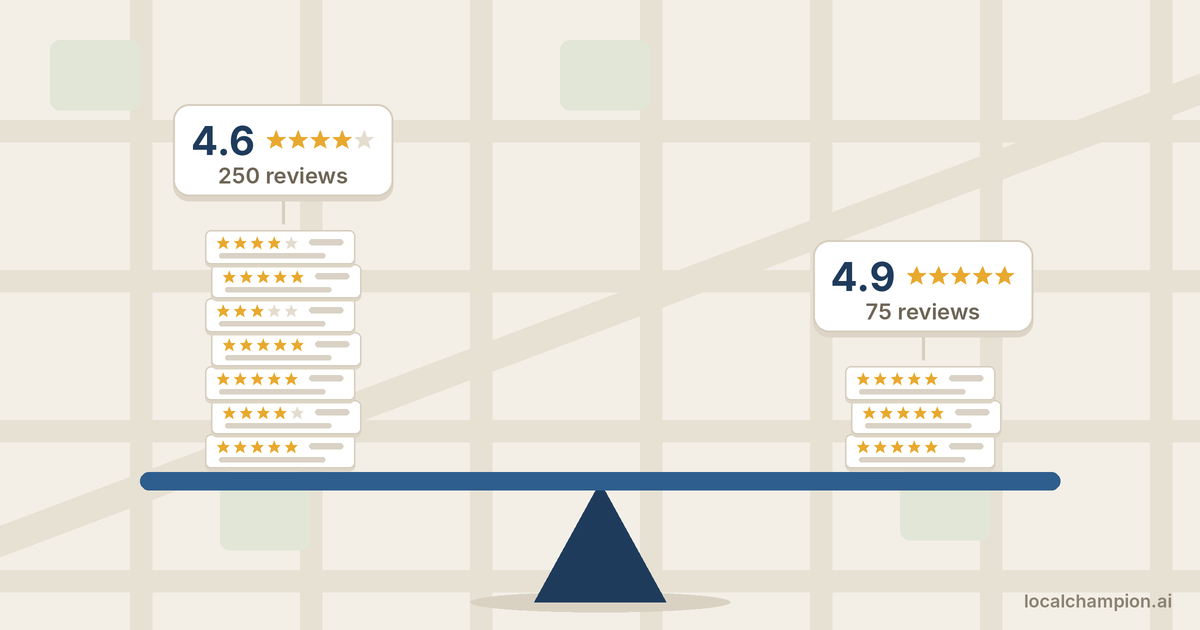

A customer searches for a dentist on Google Maps. Two practices appear side by side. One shows 4.6 stars from 250 reviews. The other shows 4.9 stars from 75 reviews. Which one gets the call?
There’s no single right answer, and that’s the point. Your Google Business Profile review count and average star rating tell customers two different things. The count says how many people have vouched for you. The rating says how happy they were. Customers read both, often in the same glance, and so should you.
This guide explains how Google calculates your rating, how to work out the number of reviews you need to move it, why the numbers sometimes change on their own, and how to grow both without breaking Google’s rules.
What is Google Business Profile review count and average star rating?
Review count is the total number of reviews shown on your Business Profile. Average star rating is the mean of all ratings published on Google for your business, shown on a scale from 1 to 5 stars. Google displays both on Search and Maps, usually together, as in “4.7 ★ (182).”
| Review count | Average star rating | |
| What it measures | How many customers left a review | How satisfied those customers were, on average |
| What customers read into it | Popularity, track record, “is this business real?” | Quality, consistency, “will I be happy here?” |
| How fast it moves | Rises steadily with every review | Moves a lot early, then barely moves once you have many reviews |
| What it hides | Whether reviews are good or bad | How many people the average is based on |
The star rating and the written review are also different things. A star is a single number from 1 to 5. The written review explains why. Two 4-star reviews can mean “great, but parking was hard” or “food was fine, staff were rude.” The average captures neither. That’s why customers scroll past the number to read recent reviews, and why you should too.
How does Google calculate average star ratings?
Google’s review score is a simple average of every rating published on Google for your business. Google’s help page says scores run from 1 to 5 stars, and that after a new review it can take up to 2 weeks for the updated score to show.
Two words in that definition matter. “Published” means reviews removed for policy violations, or still being checked, don’t count. “Average” means every published rating carries the same weight, whether it came yesterday or five years ago.
The formula
\text{Average rating} = \frac{\text{Sum of all published star ratings}}{\text{Number of published ratings}}
Three worked examples
These are illustrative businesses, not real data.
Example 1: a new café with 10 reviews. Six 5-star, two 4-star, one 3-star and one 1-star review.
- Sum: (6 × 5) + (2 × 4) + (1 × 3) + (1 × 1) = 30 + 8 + 3 + 1 = 42
- Average: 42 ÷ 10 = 4.2 stars
Example 2: a plumber with 20 reviews. Fifteen 5-star, four 4-star and one 1-star review.
- Sum: 75 + 16 + 1 = 92
- Average: 92 ÷ 20 = 4.6 stars
Example 3: the same 1-star review, two very different businesses. Business X has 8 reviews, all 5 stars. Business Y has 200 reviews, all 5 stars. Each then gets one 1-star review.
- Business X: (40 + 1) ÷ 9 = 4.56, a drop of almost half a star
- Business Y: (1,000 + 1) ÷ 201 = 4.98, barely a change
Example 3 is the most useful one to remember. The more reviews you have, the less any single review moves your rating, in either direction.
How long does Google take to update star ratings?
Up to 2 weeks after a new review, according to Google. New reviews also go through automated policy checks first, which Google says can take a few days. So a rating that hasn’t moved a week after a burst of reviews isn’t necessarily a problem.
One caution: Google doesn’t document how it rounds the displayed rating. Treat any calculation in this guide as an estimate of the underlying average, not a prediction of the exact decimal shown.
Review count vs average star rating: which matters more?
Neither on its own. Review count shows how much evidence sits behind a rating. The rating shows what that evidence says. A high rating from a handful of reviews is a promising start; a slightly lower rating from hundreds of reviews is a proven track record.
Four businesses compared
Imagine four illustrative salons in the same neighbourhood:
| Business | Review count | Average rating | What a customer is likely to read into it |
| A | 50 | 4.9 | Excellent so far, but a fairly short record |
| B | 250 | 4.7 | Consistently good over a long period |
| C | 500 | 4.4 | Very popular, with a visible share of mixed experiences |
| D | 120 | 4.8 | Strong and established; arguably the best balance |
Business C isn’t worse than Business A just because its rating is lower. Its 500 reviews show a long history, and the dip may come from a few bad months years ago. Business A’s 4.9 could fall to 4.6 after a handful of poor reviews, because each one carries more weight.
Put another way, the 500-review business at 4.4 stars sits 300 stars short of a perfect score (500 × 0.6). The 80-review business at 4.9 sits only 8 stars short (80 × 0.1). That’s why a strong small-volume rating can fall quickly, while a large-volume rating barely moves. The same decimal means very different things at different volumes.
The four count-and-rating scenarios
| Scenario | What it usually signals | Where to focus |
| High count, high rating | Established and trusted | Keep reviews recent, keep replying, watch for slow decline |
| High count, lower rating | Popular, but with recurring issues | Find the repeated complaint and fix it; the rating will follow slowly |
| Low count, high rating | Promising but unproven | Ask more customers, consistently; volume adds credibility |
| Low count, low rating | Early problems, quickly visible | Fix the service issue first, then ask happy customers for feedback |
Customers also notice recency. Fifty reviews from last year say more than 50 reviews from 2019, even with the same average.
How many Google reviews does a business need?
There is no universal number. Google doesn’t publish a target, and no review count guarantees rankings or sales. The useful benchmark is local: how many reviews the businesses you compete with in the same search have, and how recently they got them.
To find yours, search the main service you offer plus your city on Google Maps, note the review count and rating of the top five or so results, and aim to be within their range, then keep pace with them.
Review volume also varies a lot by industry, because some businesses see many more customers than others:
| Industry | Why volume differs | What to watch |
| Restaurants and cafés | Many customers a day, quick visits, high review habit | Recency matters most; a strong month can be undone by a bad one |
| Healthcare and dental practices | Fewer, longer relationships; patients may hesitate to share health details | Privacy: replies must never confirm someone is a patient or discuss treatment |
| Home services (plumbers, electricians, HVAC) | Fewer jobs, but high-value and high-trust | Reviews that mention the job and the area help customers judge fit |
| Hotels | Steady guest flow, many review platforms competing for attention | Consistency across Google and other travel sites |
| Retail stores | High foot traffic, low emotional involvement per visit | Customers rarely review unless prompted at the counter or by receipt |
| Professional services (lawyers, accountants, consultants) | Small client lists, long engagements | A few detailed reviews can carry real weight; confidentiality limits what clients will share |
Two patterns hold across every industry. A steady stream of genuine reviews looks more trustworthy to customers than a sudden spike. And Google’s own systems watch for unusual bursts of reviews, so artificial growth can backfire.
How many 5-star reviews do you need to increase your Google rating?
You can estimate it with one formula, using the rating and review count shown on your profile. The answer is the number of additional 5-star reviews needed, assuming no other reviews arrive in the meantime.
The formula
\text{New 5-star reviews needed} = \frac{(\text{Target rating} \times \text{Current review count}) – (\text{Current rating} \times \text{Current review count})}{5 – \text{Target rating}}
Round the result up to the next whole review. The top line is the gap in “rating points” between where you are and where you want to be. The bottom line is how much each new 5-star review closes that gap.
Four worked examples
All four businesses are illustrative.
| Starting point | Target | Calculation | New 5-star reviews needed |
| 4.0 stars, 80 reviews | 4.2 | (336 − 320) ÷ 0.8 | 20 |
| 4.2 stars, 120 reviews | 4.5 | (540 − 504) ÷ 0.5 | 72 |
| 4.5 stars, 200 reviews | 4.7 | (940 − 900) ÷ 0.3 = 133.3 | 134 |
| 4.6 stars, 150 reviews | 4.8 | (720 − 690) ÷ 0.2 | 150 |
Notice the pattern. Each step closer to 5.0 gets more expensive, because the denominator (5 − target) shrinks. Going from 4.6 to 4.8 needs as many new 5-star reviews as the business already has.
Treat these as estimates, not promises. The displayed rating is rounded, so a “4.2” could really be anything from about 4.15 to 4.24. Any 4-star or lower review in the meantime raises the number needed. And Google may take up to 2 weeks to show the new average. No number of reviews guarantees a particular displayed rating.
Why one review matters less as you grow
The same maths explains why a single bad review feels devastating to a new business and barely registers for an established one.
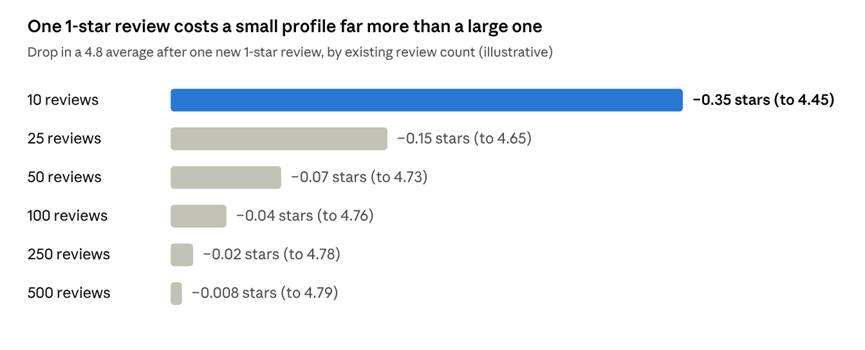
Calculated · one 1-star review added to a 4.8 average at each review count, illustrative
At 10 reviews, one 1-star review drags a 4.8 down to about 4.45. At 500 reviews, the same review barely registers. Growing your review volume protects your rating as much as it builds trust.
Do review count and star rating affect local SEO rankings?
Yes, as one part of prominence. Google says local results are based mainly on relevance, distance and prominence, and that more reviews and positive ratings can help a business’s local ranking. Reviews are one input among several, not a switch.
| Factor | Google’s description | Where reviews fit |
| Relevance | How well a profile matches the search | Indirect: complete categories, services and descriptions do the main work |
| Distance | How far the business is from the searcher, or the searched location | None; reviews can’t change your address |
| Prominence | How well-known the business is, online and offline | Review count and ratings are named inputs, alongside links and other web information |
It helps to separate what Google has said from what the SEO industry believes:
- Confirmed by Google: review count and positive ratings can help local ranking; replying to reviews shows customers you value their feedback.
- Widely observed, not confirmed: the words customers use in reviews, and how recent reviews are, may influence visibility. Treat these as reasonable hypotheses, not rules.
- Not true: there is no rating or review count that guarantees a top-three Maps position. A 4.8 with 100 reviews can rank below a 4.5 with 40 reviews if that business is closer to the searcher or a better category match.
Reviews also affect what happens after a search. Customers compare ratings in the list before they click. So even when reviews don’t move your position, they can change how many people call you.
Why did my Google review count or rating change?
Most unexpected changes come from reviews being checked, removed or merged, not from errors. Google screens every review against its policies, keeps monitoring them after they go live, and removes those that break the rules.
Why the review count looks wrong
Google’s help page on missing reviews lists these causes:
- Policy checks: new reviews can take a few days to appear while Google checks them.
- Policy removals: reviews removed for violations are gone for good and won’t be restored.
- Spam detection: Google’s systems occasionally remove legitimate reviews by mistake. Google asks businesses to contact support if this happens.
- Profile merges: after two profiles are merged, reviews from both can take a few days to show.
- Reinstatement: reviews can be removed after a suspended profile is reinstated.
- Temporary restrictions: Google can temporarily disable reviews for some profiles or business categories.
- Customer app problems: a customer on an old version of Google Maps may think they posted a review that never went through.
One category is a special case: Google has removed and disabled reviews for profiles categorised as schools for students aged 6 to 18. Universities, daycare centres and swim schools aren’t affected.
You may also see slightly different counts on Google Search and Google Maps for short periods. Google doesn’t document why, but it usually reflects updates still working through its systems. If a gap lasts more than a couple of weeks, contact Business Profile support.
Why the rating dropped
Work through this checklist before you assume something is wrong:
- ☐ Read your newest reviews. A few low ratings are the most common cause.
- ☐ Compare today’s review count with last month’s. Fewer reviews may mean positive ones were removed.
- ☐ Check whether two profiles were merged recently.
- ☐ Check whether the profile was suspended and reinstated.
- ☐ Wait up to 2 weeks after recent reviews for the score to update.
- ☐ Look for a cluster of similar negative reviews in a short time; if they break Google’s policies, report them.
Five troubleshooting scenarios
All five are illustrative.
| What happened | Likely explanation | What to do |
| 20 new reviews, rating unchanged. A shop with 300 reviews at 4.6 gets 20 new 5-star reviews. | The true average rises only to about 4.63, which still displays as 4.6. Updates can also take up to 2 weeks | Nothing is wrong. Keep the reviews coming; large profiles move slowly |
| 15 reviews gone overnight. | Policy removals, a spam filter sweep, or reviews from a prior incentive campaign being caught | Check whether the missing reviews share a pattern. If they were genuine, contact support. If they came from incentives, stop the practice |
| A competitor with fewer reviews ranks higher. | They may be closer to the searcher, better matched on category, or more prominent elsewhere on the web | Audit categories, services and profile completeness, not just reviews |
| 4.9 stars, but few enquiries. | Rating is strong but volume is low, so customers may not trust it yet; or the profile is missing photos, services or accurate hours | Grow genuine review volume and complete the profile; check which searches it appears for in Performance |
| Hundreds of reviews, rating slowly falling. | A recurring issue in recent experiences, outweighing older praise | Read the last 3 months of reviews, group the complaints, and fix the most common one first |
How to get more genuine reviews and improve your rating
Ask every customer, make it easy, and fix what reviews tell you. Review count grows when asking becomes routine. Ratings improve when the service problems behind low reviews get fixed, not when low reviews get hidden.
Building a review habit
- Ask after a genuine, completed experience. The best moment is right after the job is done or the meal is finished, while the experience is fresh.
- Use Google’s own review link. On a computer, open your profile at business.google.com, select Read reviews, then Get more reviews. You can copy the link or save a QR code. Google’s instructions note that QR codes are created in a computer browser.
- Put the link where customers already are: follow-up emails, SMS confirmations, invoices and receipts.
- Print the QR code for counters, tables, waiting rooms and the back of business cards.
- Train staff to ask simply and neutrally: “Would you mind sharing your experience on Google? It really helps us.” The same request goes to every customer.
- Remove friction. Customers must be signed in to a Google account to leave a review. Tell them it takes under a minute, and that any email address can be used to create an account.
- Reply to reviews, good and bad. Google recommends short, professional, specific replies. Google says replies show customers that you value their feedback.
- Make it a process, not a campaign. A few reviews every week beats 50 in one month and none for the next six.
Improving your rating ethically
- Find the repeated complaint. Group your last 50 reviews by theme: wait times, pricing, communication, cleanliness. One theme usually dominates the low ratings.
- Fix the cause, then tell people. If wait times were the problem and you’ve added staff, say so in replies to new reviews that mention it.
- Reply to negative reviews quickly and calmly. Don’t share private details or argue. Offer a way to continue offline.
- Ask everyone, not just happy customers. More reviews from your typical customer base usually pull the average toward your real service quality.
Tactics by industry
| Industry | When to ask | How to ask |
| Restaurants and cafés | When the bill arrives, or by email the next morning | QR code on the bill folder or table card |
| Healthcare and dental | After the visit, by SMS or email | Neutral message; never ask patients to describe treatment, and never reveal patient details in replies |
| Home services | When the job is signed off | Technician mentions it; link sent with the invoice |
| Hotels | At checkout or in the post-stay email | Link in the post-stay email; QR code at reception |
| Retail | At the till or on the receipt | QR code at the counter and on receipts |
| Professional services | At a project milestone or close | Personal email from the account lead with the link |
What Google prohibits
Google’s user-generated content policy bans practices that inflate ratings. Reviews that break it are removed, and Google’s systems actively look for the patterns these tactics create. Don’t:
- Buy reviews, or pay for them “in kind.”
- Offer incentives, such as discounts, freebies or prize draws, in exchange for reviews.
- Gate reviews: Google prohibits discouraging negative reviews or selectively asking only happy customers.
- Review yourself, or ask employees or people with a conflict of interest to review you.
- Pressure customers into leaving ratings.
- Post from multiple accounts, or ask one person to do so.
Google also says a mix of positive and negative feedback often feels more trustworthy to customers. A perfect 5.0 with a handful of reviews can look less believable than a 4.7 with plenty.
How to monitor review performance each month
Track the trend, not the day. A single review rarely changes much, and Google’s score can lag by up to 2 weeks. A monthly check shows whether things are improving and catches problems before they compound. A spreadsheet is enough.
| Metric | How to find it | What to look for |
| Total review count | Your profile on Search or Maps | Steady growth; any unexplained fall |
| Average star rating | Your profile on Search or Maps | Direction over 3 to 6 months, not single moves |
| New reviews this month | Reviews list, sorted by newest | Is volume consistent? |
| Positive, neutral and negative split | Count 4–5, 3 and 1–2 star reviews this month | A rising share of 1–2 star reviews |
| Response rate | Reviews replied to ÷ new reviews | Aim to reply to every review |
| Top complaint themes | Read and tag this month’s lower reviews | The same theme appearing month after month |
| Competitor benchmarks | Top 3–5 competitors on Maps for your main search | Their count and rating growth versus yours |
| Sentiment shift | Compare this month’s themes with last month’s | Praise or complaints that are new |
Your monthly 30-minute review checklist
- ☐ Record review count and rating in your tracking sheet.
- ☐ Reply to every review you haven’t answered yet.
- ☐ Tag this month’s low reviews by theme and share the top theme with your team.
- ☐ Report any reviews that clearly break Google’s policies (spam, off-topic, conflict of interest).
- ☐ Check competitor counts and ratings for your main search.
- ☐ Confirm the review link and QR codes still work and are in use.
- ☐ Pick one service improvement for next month based on what reviews said.
Frequently asked questions about Google review count and average star rating
How does Google calculate average star ratings?
Google averages every rating published on Google for the business, on a scale of 1 to 5 stars. Add all published star ratings and divide by the number of published ratings.
Is the Google Business Profile rating calculated using all reviews?
It uses all published ratings. Reviews removed for policy violations, or still being checked, don’t count.
How many Google reviews does a business need?
There’s no official number. Compare yourself with the top businesses that appear for your main service and city on Google Maps, and aim to match their range with a steady flow of genuine reviews.
Is a 4.5-star Google rating good?
Usually, yes, especially with a healthy review count. What counts as good depends on your competitors: a 4.5 can lead one local market and trail another.
How many 5-star reviews are needed to increase a 4.2 rating?
It depends on your review count. With 120 reviews, reaching an average of 4.5 takes about 72 new 5-star reviews: (4.5 × 120 − 4.2 × 120) ÷ (5 − 4.5). Treat it as an estimate.
Does Google review count affect local SEO rankings?
Google says the number of reviews and positive ratings can help local ranking, as part of prominence. Relevance and distance still matter, so reviews alone don’t guarantee a position.
Why is my Google review count decreasing?
Usually because Google removed reviews for policy reasons or through spam detection. Merges, reinstatements and temporary restrictions can also change the count.
Why did my Google star rating suddenly drop?
The most common causes are new low ratings or removed positive reviews. Profile merges and delayed recalculation can also move the number.
How long does Google take to update average star ratings?
Google says it can take up to 2 weeks after a new review for the updated score to appear.
Can a business with fewer reviews rank higher on Google Maps?
Yes. A business with fewer reviews can rank higher if it’s closer to the searcher, a better match for the search, or more prominent in other ways.
Do owner responses affect Google star ratings?
No. Replies don’t change the rating, which is calculated from customer ratings only. Google does recommend replying, because it shows customers you value their feedback.
Can businesses remove negative Google reviews?
Not directly. You can report a review, but Google removes only reviews that break its policies. Disagreeing with a review isn’t grounds for removal.
Do 1-star reviews affect the average more than 5-star reviews?
For most businesses, yes. A 1-star review sits further below a typical 4.5 average than a 5-star sits above it, so it pulls the average further. Its impact shrinks as your review count grows.
Why do Google Maps and Google Search show different review counts?
Google doesn’t document this. Small, short-lived differences usually reflect updates still processing. Contact Business Profile support if the gap persists.
What is more important: review count or average star rating?
Both. Count shows how much evidence sits behind your rating; the rating shows what that evidence says. Customers weigh them together, along with how recent the reviews are.
Final thoughts: build a stronger Google review profile through genuine customer experiences
Your Google Business Profile review count and average star rating work as a pair. Volume gives your rating credibility; the rating tells customers what to expect. Chasing either one alone, especially with shortcuts, tends to backfire.
The businesses with the strongest review profiles do three ordinary things consistently: they ask every customer, they reply to every review, and they fix what reviews keep pointing to. The numbers follow.
If you want help putting that into practice, LocalChampion works with local and multi-location businesses on review responses, sentiment analysis and review generation strategy as part of its Google Business Profile optimization service. Book a free audit to see where your review profile stands against local competitors.